Building a Seamless Digital Mental Health Intake Workflow for Every Clinical Specialty
When a client reaches out for mental health support, their initial experience shapes their entire perception of care. Paper forms clipped to a clipboard in a waiting room or generic PDFs sent via unencrypted email can create friction before a single session begins. Customizing intake forms for different modalities improves data collection, establishes trust, supports legal compliance, and sets clear therapeutic boundaries from day one.
According to research published by the American Psychological Association (APA), streamlined and transparent onboarding processes directly correlate with higher client retention and reduced administrative burden for clinicians. Transitioning from paper to electronic intake forms in counseling allows providers to tailor clinical assessments to specific therapeutic needs while keeping protected health information secure.
Let’s get started
Watch this video:
or
read the guide below.
What You’ll Learn
- Why a one-size-fits-all intake form creates clinical and operational bottlenecks
- Key customization requirements for couples, trauma, pediatric, and addiction therapy
- How automated therapy scheduling and intake integration cuts administrative workload
- Essential legal, consent, and HIPAA compliance factors for digital documentation
- Comparison of traditional paper workflows versus modern client portal onboarding
- Key decision-making criteria when selecting customizable EHR intake templates
Everything in one place: clients, notes, forms, appointments, reports, and outcomes. 👉 Try it Free - No credit card needed💡All-in-one Case Management Software.
Why Is Customizing Intake Forms Essential for Modern Practice Management?
Every client enters care with unique history, goals, and risk factors. Using a generic intake form for a couple seeking marriage counseling, a teen managing anxiety, and an adult processing complex trauma leads to missed clinical nuances and redundant questions.
Custom intake forms for therapy practice allow providers to gather relevant clinical data before the first appointment. When clinicians ask targeted questions, clients feel understood from the start. On an operational level, tailoring digital mental health intake workflow templates eliminates unnecessary fields, reducing paperwork fatigue for clients and documentation time for clinicians.
What Should Be Included in a Private Practice Therapy Intake Form?
Every comprehensive intake package requires core demographic, financial, and legal framework elements alongside specialized clinical questions. Combining standard administrative data with specialty questions ensures full compliance and clinical depth.
Standard intake packages typically include four core components:
- Demographic and Contact Information: Basic details, emergency contacts, preferred communication methods, and primary care provider contacts.
- Informed Consent and Practice Policies Intake: Financial agreements, cancellation policies, telehealth consent, and limits of confidentiality.
- Medical History and Progress Tracking Forms: Current medications, past psychiatric care, medical conditions, and baseline symptom measures.
- Specialty-Specific Clinical Questionnaires: Assessment modules tailored to specific therapeutic frameworks.
👉 Try it Free - Free Case Management System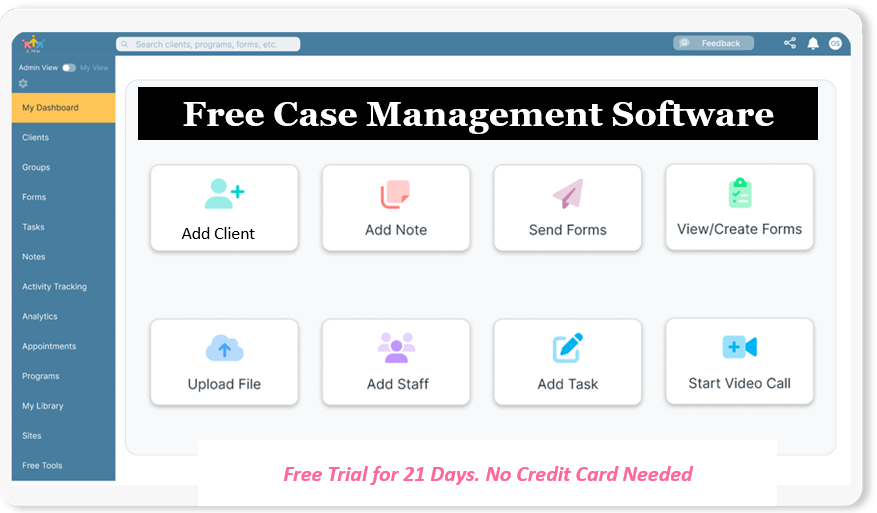
How Do You Tailor Intake Workflows for Specific Clinical Specialties?
Couples and Family Therapy
Couples therapy intake form customization requires gathering individual perspectives alongside relational history. Sending a joint form often leads to one partner dominating the narrative. Modern digital workflows send separate, private questionnaires to each partner before the shared assessment.
Key elements include:
- Individual goals for treatment and perception of core relationship challenges
- Secret-keeping policies and relational boundaries
- History of intimate partner violence or safety concerns evaluated privately
- Assessment of commitment levels to the relationship
Trauma-informed Care
A trauma-informed therapy intake questionnaire must prioritize psychological safety. Posing overly detailed questions about trauma history during intake can cause dysregulation before a therapeutic relationship exists.
Best practices include:
- Offering opt-out choices for sensitive history questions
- Framing questions around current coping styles and felt safety
- Screening for sensory triggers and preferred grounding techniques
- Explaining clearly why specific background information is requested
Child and Adolescent Counseling
Child and adolescent mental health intake forms require dual-track documentation: one form for legal guardians regarding developmental history, and an age-appropriate assent form for the youth.
Essential components include:
- Custody agreements and legal guardianship verification
- Developmental, academic, and social milestones
- Behavioral observations from parents and school staff
- Youth self-report screening tools for mood and social connection
Substance Abuse and Addiction Treatment
Substance abuse assessment intake templates require systematic tools to evaluate risk, dependency levels, and physical health considerations.
Key focus areas include:
- Validated screening screeners such as AUDIT or DAST
- Medical detoxification history and physical withdrawal risks
- Identification of personal triggers and historical recovery assets
- Dual-diagnosis screening for co-occurring mood disorders
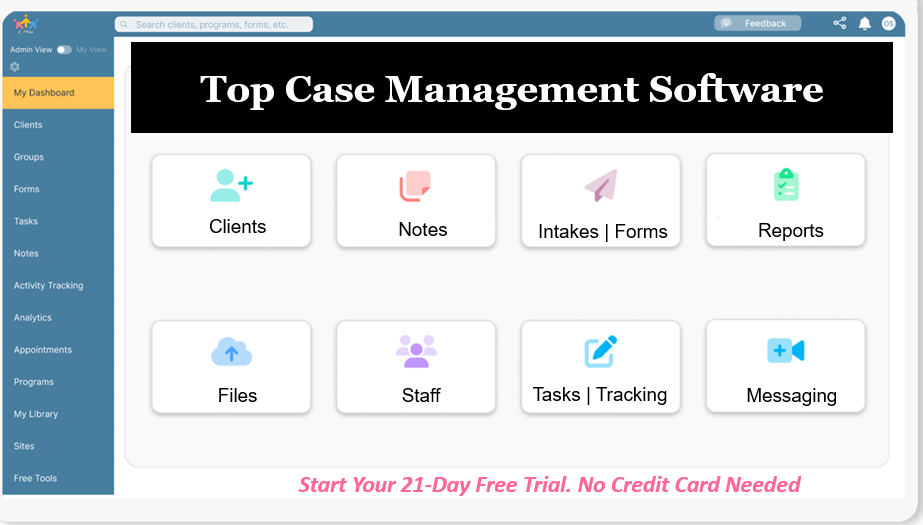
Do You Have a Team? Our best all-in-one client and top case management software simplifies everything from client intake and assessments to programs, projects, goals tracking, planning, scheduling, documentation, reporting dashboard, and progress tracking.All-in-One Case Management Software
Sign Up Today, Free
No credit card needed!
How Do Paper and Digital Intake Workflows Compare?
Evaluating the operational differences between manual paperwork and integrated digital forms highlights clear advantages for client engagement and practice profitability.
| Operational Area | Traditional Paper Intake | Integrated Digital Client Portal |
| Client Completion Time | Completed in waiting room 15 minutes prior to session | Completed at home on desktop or mobile prior to arrival |
| Data Accuracy | Manual transcription risk, illegible handwriting | Direct client entry with validated form fields |
| HIPAA Compliance | Physical lock and key storage required | Encrypted client portal documentation and file storage |
| Integration | Manual filing into paper charts | Automatic syncing into all-in-one therapy practice management software |
| No-Show Impact | Higher initial drop-off due to onboarding friction | Lower drop-off with automated therapy scheduling and intake integration |
What Are the Best Practices for Mental Health Intake Documentation and Compliance?
Maintaining regulatory compliance and data security is paramount when transitioning to electronic forms. The U.S. Department of Health and Human Services (HHS) outlines strict technical and administrative standards under the HIPAA Security Rule for handling electronic protected health information.
To ensure full compliance and clinical rigor, follow these core standards:
- Verify Business Associate Agreements (BAAs): Ensure your software vendor signs a BAA to guarantee HIPAA compliant online intake forms.
- Maintain Audit Trails: Utilize systems that track when intake packets are sent, opened, completed, and signed.
- Obtain Explicit Telehealth Consent: Outline state jurisdiction rules, crisis protocols, and technology requirements for remote sessions.
- Establish Clear Record Retention Policies: Store intake records according to state licensing board guidelines and APA standards.
How Do You Choose the Right EHR Intake Software for Your Practice?
When evaluating customizable EHR intake templates, practice managers and solo clinicians should weigh key operational decision factors:
- Flexibility of Form Builder: Can you easily build custom fields, conditional logic, and specialty screeners?
- Client Portal Experience: Is the interface mobile-friendly, intuitive, and accessible for clients of all technical skill levels?
- Workflow Automation: Does the tool automatically trigger intake packets upon scheduling and send reminder notifications?
- All-in-One Capabilities: Does the platform combine scheduling, intake, progress tracking, file storage, and medical billing specialists support?

People Also Ask
What makes an intake form HIPAA compliant?
A HIPAA compliant intake form uses end-to-end encryption to collect and store client health information electronically. The software platform hosting the form must execute a Business Associate Agreement (BAA) with the practice and maintain strict access controls and audit logs.
How do custom intake forms reduce client no-shows?
Digital intake forms sent in advance engage clients immediately after scheduling. Completing paperwork ahead of time increases client commitment, screens out unmotivated inquiries early, and allows practice administrators to send automated intake completion reminders.
Can couples fill out intake forms separately?
Yes. Best practices in couples counseling recommend sending individual, private intake forms to each partner. This allows clinicians to gather unbiased histories and screen for safety concerns confidentially before the joint intake session.
What is the difference between client consent and intake assessment?
Informed consent forms establish legal and operational boundaries, such as fee structures, cancellation policies, and confidentiality limits. An intake assessment collects clinical data, medical history, baseline symptoms, and treatment goals.
How long should intake documentation be retained?
Record retention requirements vary by state law and professional credentialing boards. Generally, clinical records for adult clients must be retained for at least 7 years, while child records must often be kept for 7 years past the age of majority.
Why should intake forms integrate with scheduling software?
Automated therapy scheduling and intake integration eliminates manual administrative work. When a client books an appointment, the system automatically dispatches the correct custom intake packet based on the selected service type.
Streamline Your Practice with Case Management Software
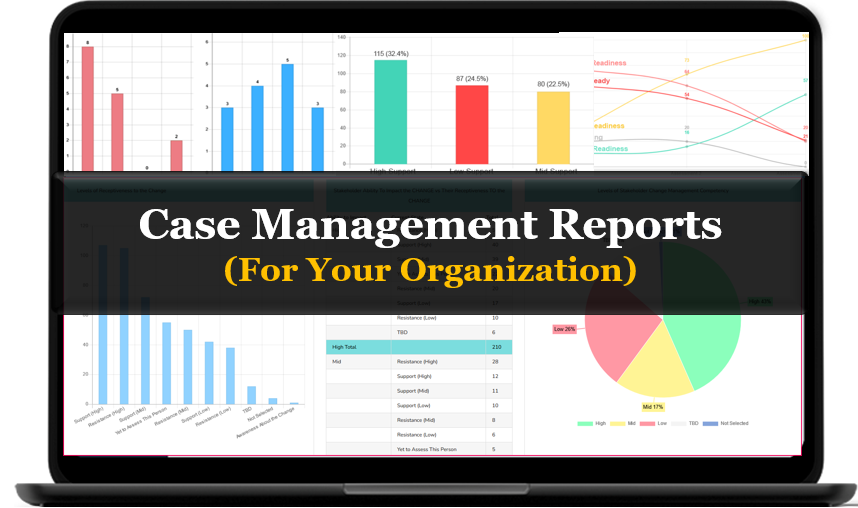
Managing client intake forms, progress notes, and documentation does not need to consume hours of administrative time. Case Management Hub provides intuitive case management software that simplifies client onboarding, secure file storage, assessment tracking, and practice workflows for mental health professionals and agency teams.
See how easy it is to Create, Edit, and Send a form in Case Management Hub (Quick tip: These same steps work for any of our built in form templates):
Step 1:
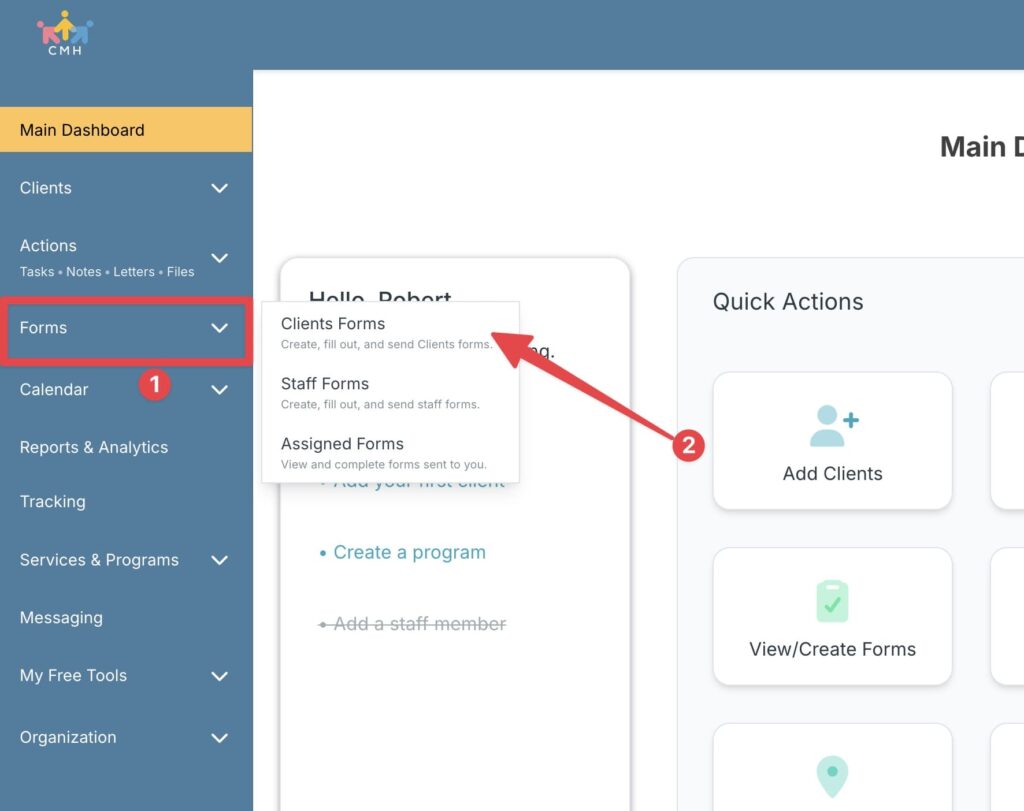
From the sidebar, click on the Forms module, search for Basic Intake Form, then click the title to open it.
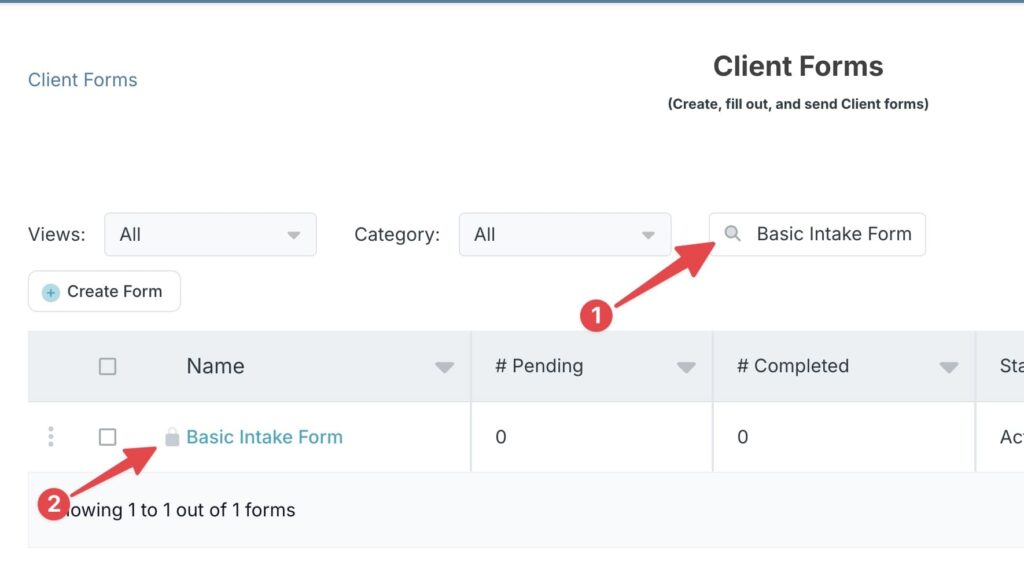
Tip: Forms with a padlock are master templates provided by Case Management Hub to help you get started. You can easily customize these to make them your own.
Step 2:
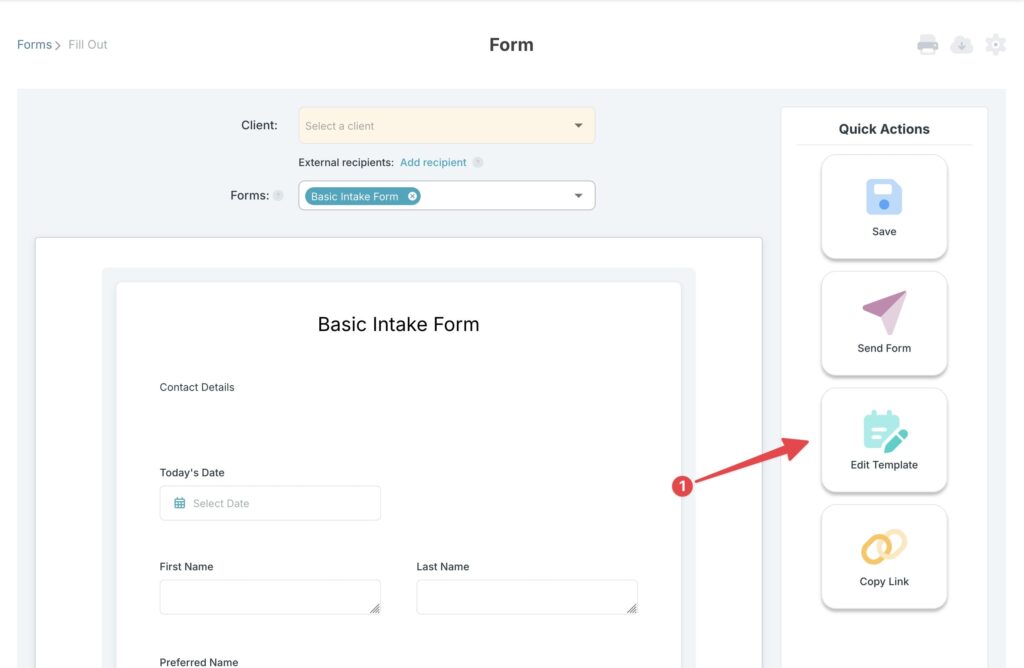
Click Edit Template to start customizing the form to your needs. Once done, click Save.
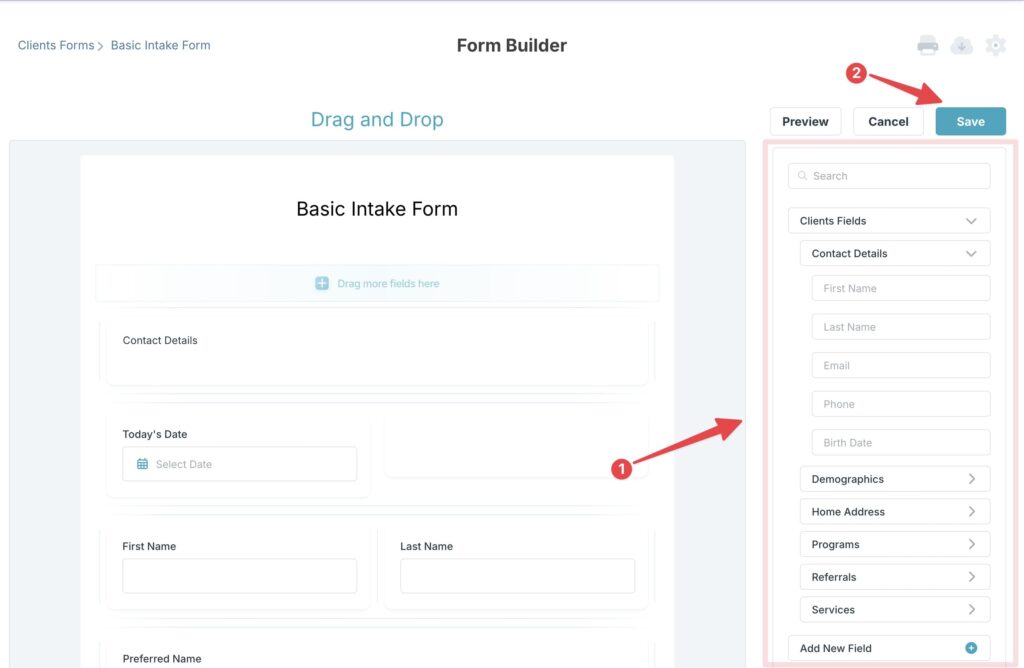
Tip: You can add new form fields using the right sidebar. Just drag them straight into your form.
Step 3:
Select a client to start filling out the form on their behalf. Once done, click Save.
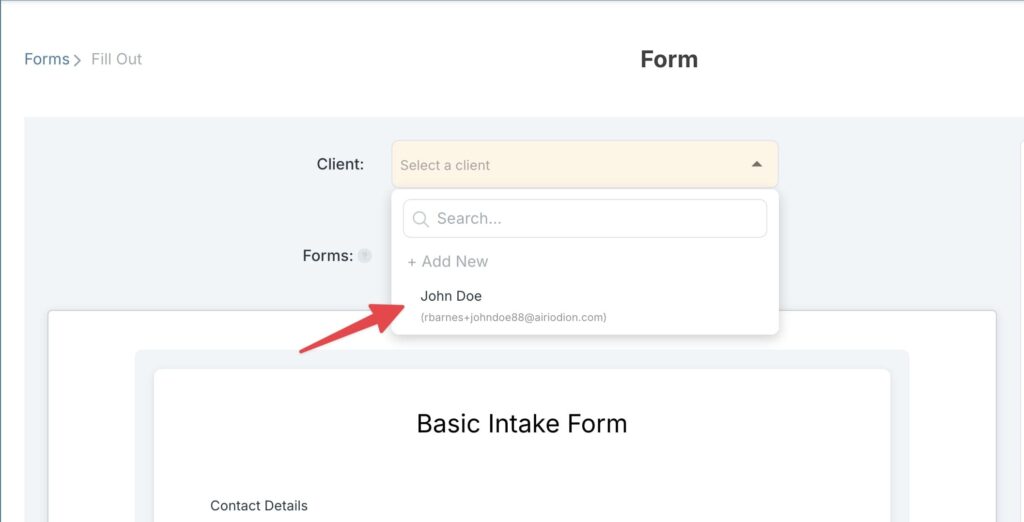
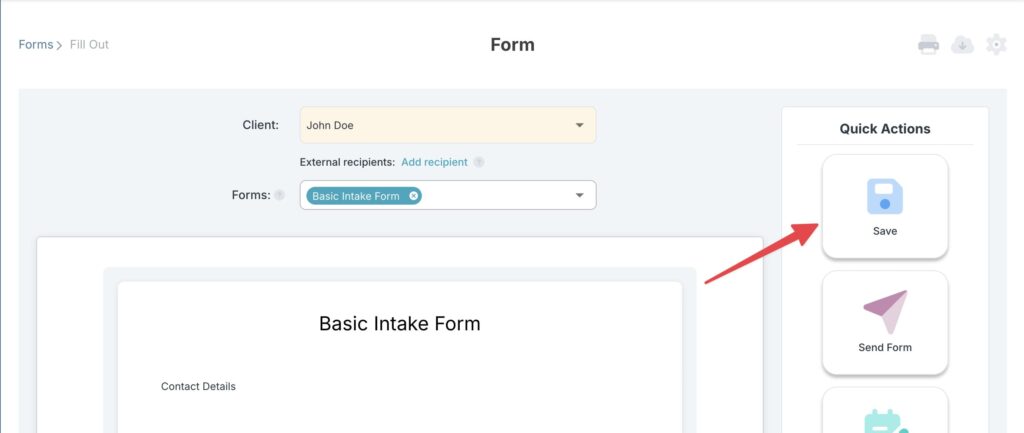
Tip: No need to re‑type your client’s data, it magically fills in the form for you, saving you time.
Step 4:
Or to send the form directly to a client, click Send Form, then select the clients. When you’re ready click Send.
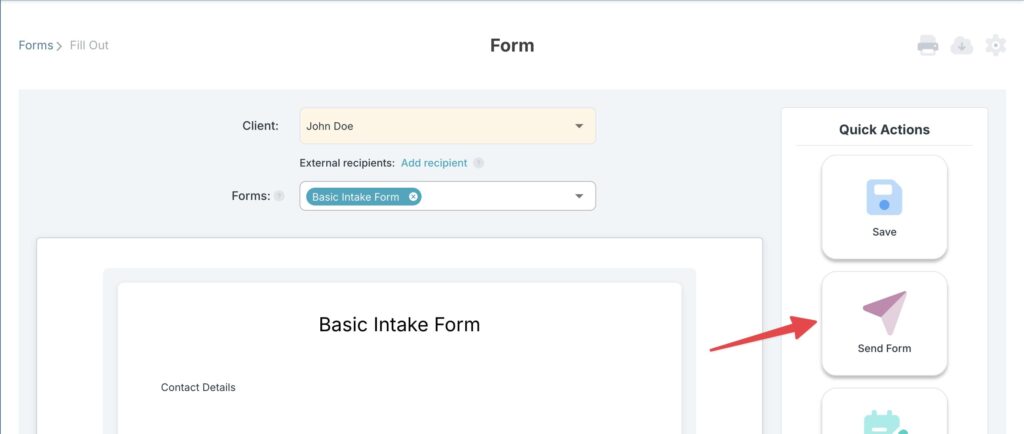
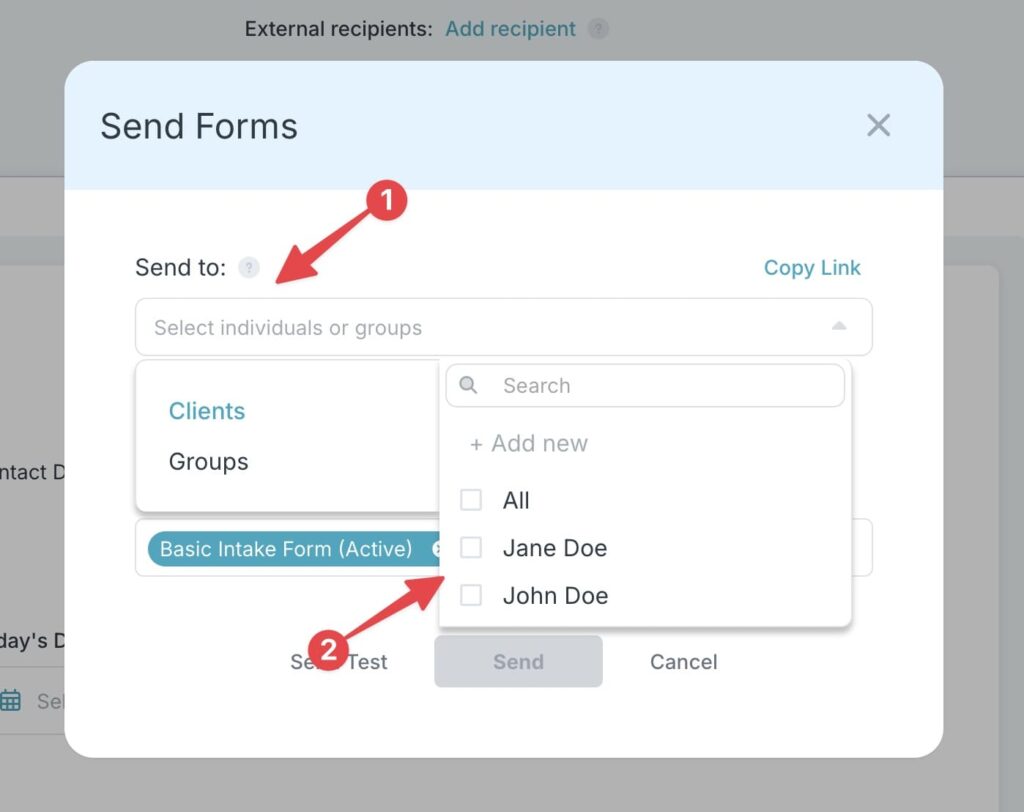
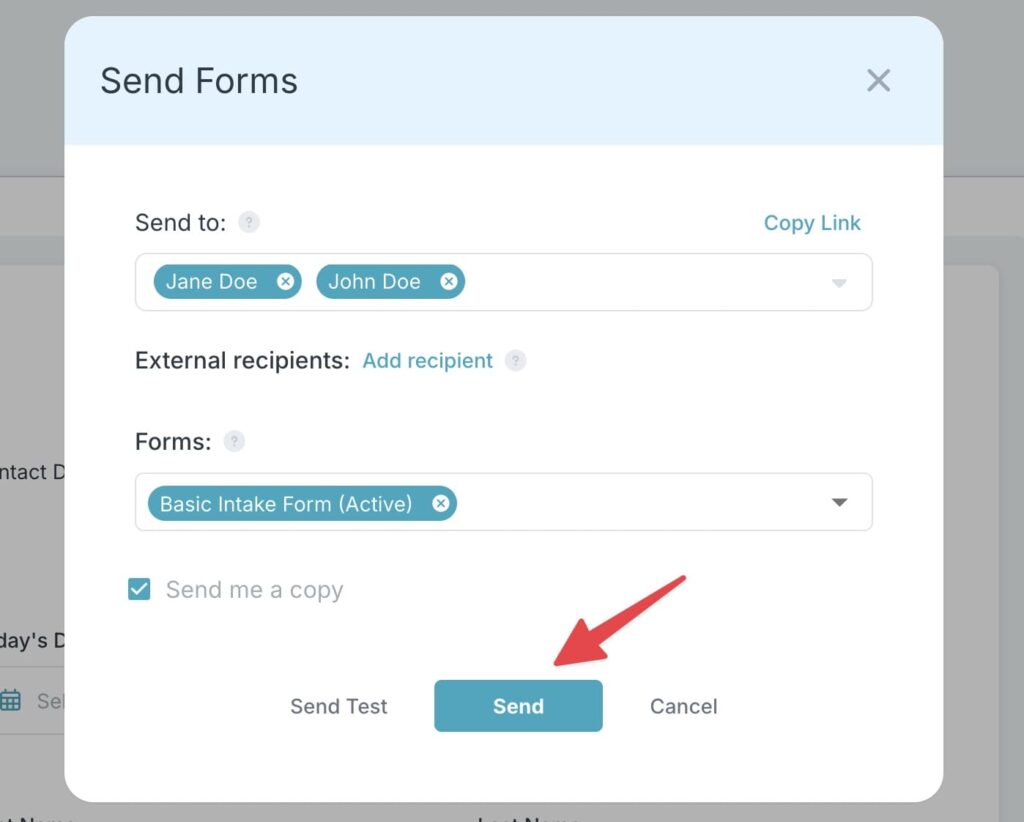
Tip: You can send the form to clients that are not yet part of Case Management Hub (External recipients) by clicking “Add recipient” and filling out their email, first name, and last name.
Step 5:
Create a public link for your form so you can easily share it with anyone. Just click Copy Link to publish your online form.
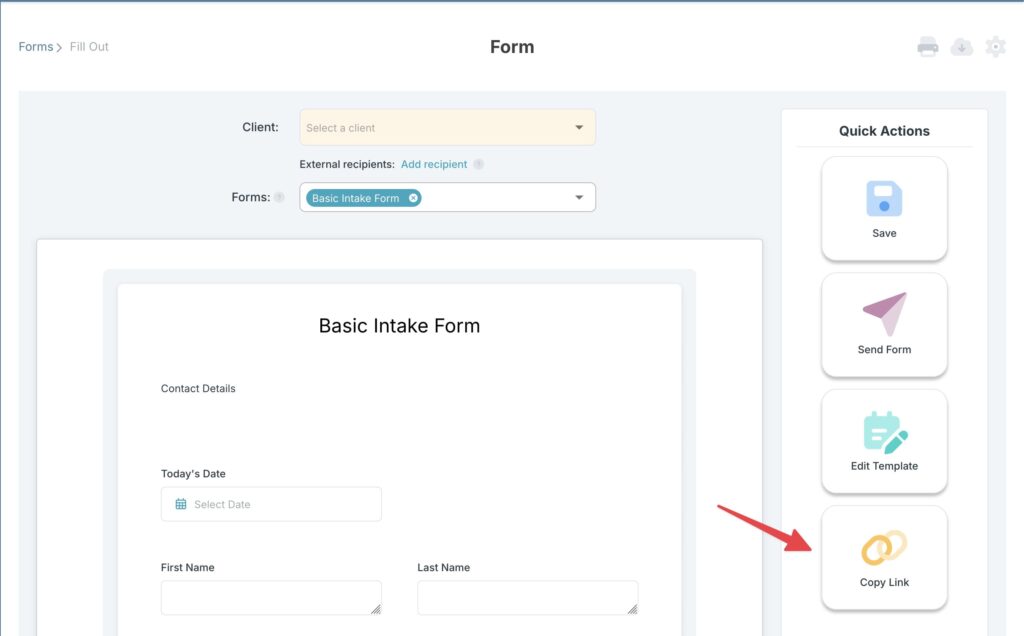
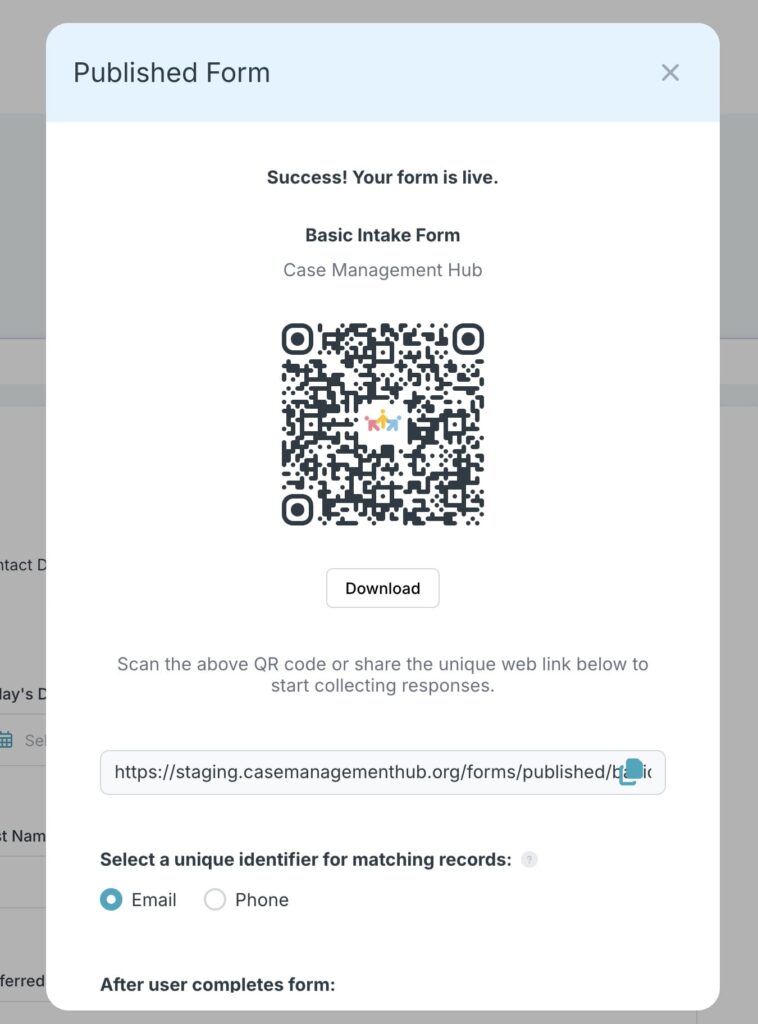
Tip: A link will automatically be created for you but you can always edit this and other form settings even after creating the online form. Just click on the gear icon in the top right corner of the form page to bring up the form settings.
Experience how effortless practice management can be. Sign up for your free 21-day trial today with no credit card required!
Frequently Asked Questions
Send automated reminders 24 to 48 hours prior to the session. If the forms remain incomplete at session time, reserve the first 10 to 15 minutes of the appointment for the client to complete their digital onboarding via a secure portal in your office or remotely.
A trauma-informed intake form should be brief and focused on current symptoms, safety, and client comfort. Detailed exploration of past trauma events should be reserved for in-person clinical sessions once therapeutic rapport is established.
Yes. Intake workflows for minor clients should include a parent or legal guardian consent and developmental history form, alongside an age-appropriate youth assent form for adolescents.
Digital forms capture accurate insurance details, demographic information, and billing authorization directly from the client. This reduces claim submission errors and speeds up reimbursement for mental health practices.
Yes. Modern clinical software allows practices to resend updated policy consents, symptom check-ins, or brief re-assessment forms to returning clients without requiring them to re-enter fixed demographic history.
Multi-specialty clinics require software with flexible permissions, custom conditional logic forms, specialty-specific screening libraries, and unified client portal documentation and file storage.What should I do if a client does not complete their intake forms before the session?
How detailed should a trauma-informed intake form be?
Can custom intake templates be used for minor clients?
How do electronic intake forms improve medical billing efficiency?
Is it possible to edit intake forms for existing clients who return to therapy?
What software features are most important for multi-specialty practices?
👉 Try it free today - No credit card needed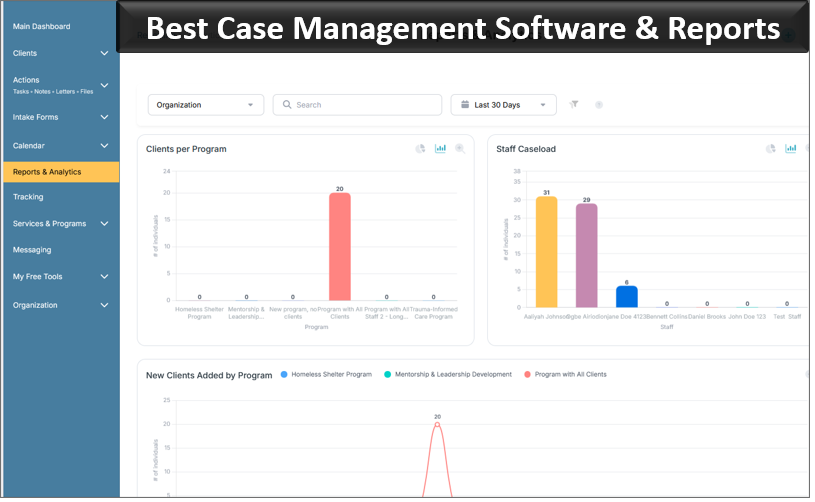
Note: Content on this website (socialworkportal.com) is copyrighted and protected under applicable copyright laws. Unauthorized reproduction, distribution, or use of any content from the website, without explicit written permission, is strictly prohibited. Read: Terms of Use.
Social Work Portal Disclaimer: Social Work Portal is not a social work agency and we do not refer social workers. This web site is provided for educational and informational purposes only and does not constitute providing medical advice or professional social and healthcare services. The information provided should not be used for diagnosing or treating a health problem or disease, and those seeking personal medical advice should consult with ... Read our full disclaimer here: Social Work Portal Disclaimer.