A Rapid Triage Guide for Frontline Clinicians
Frontline human service professionals do not burn out from difficult client conversations. The real crisis occurs between 5:00 PM and midnight, when the office doors lock and caseworkers sit in front of screens facing twenty unwritten contact logs, pending court summaries, and delinquent intake packets. When direct client crises consume the standard working day, administrative work spills directly into kitchen tables and weekend hours. This unpaid administrative catch-up creates physical exhaustion, drives high staff turnover, and exposes agencies to severe audit liabilities.
Reclaiming your weekends does not require working faster through exhaustion or sacrificing clinical thoroughness. It requires replacing reactive administrative habits with a systematic recovery framework: clinical acuity triage, standardized five-minute charting formulas, and centralized digital automation. By eliminating manual data entry and capturing documentation at the exact moment service is delivered, frontline case managers can maintain spotless, audit-ready compliance while walking out of the office on time every Friday.
Let’s get started
Watch this video:
or
read the guide below.
What You’ll Learn in This Guide
- How to triage delinquent caseloads by statutory risk rather than chronological panic
- The 72-hour catch-up protocol to eliminate accumulated documentation arrears
- Five-minute SOAP and DAP charting structures that satisfy Medicaid medical necessity
- Concurrent documentation workflows that finalize records before the client leaves
- Operational steps to replace manual paper tracking with automated digital systems
- Supervisory oversight tactics to balance team capacity and prevent future backlogs
Free Download: The 72-Hour Zero-Backlog & Audit Defense Blueprint
Download the free 72-Hour Zero-Backlog & Audit Defense Blueprint (PDF). This practical desk reference is built specifically for child welfare caseworkers, medical social workers, and behavioral health clinicians designed to help eliminate overdue progress notes without weekend overtime.
Download Your Free Resources Here
💡All-in-one Case Management Software.
Everything in one place: clients, notes, forms, appointments, reports, and outcomes.
👉 Try it Free - No credit card needed
Why Do Case Backlogs Accumulate Despite Endless Overtime?
Casework backlogs are structural operational failures rather than personal time-management flaws. According to workforce research published by the Child Welfare Information Gateway, administrative compliance and routine paperwork consume up to half of a caseworker’s total working hours, directly competing with direct client care. When an emergency foster placement, hospital discharge dispute, or acute behavioral crisis strikes, immediate safety demands a caseworker’s complete physical and mental presence. The clinical record, however, gets pushed aside.
Every deferred note incurs a compounding cognitive penalty. Documenting an interaction immediately takes five minutes. Attempting to reconstruct that same conversation five days later from fragmented desk notes, text messages, and memory takes fifteen to twenty minutes. Multiply that friction across thirty or forty active cases, and a clinician faces ten to fifteen hours of deferred charting every single week. This reality is why reducing overtime for social service workers cannot be accomplished by simply telling staff to work harder.
Outdated administrative practices exacerbate this bottleneck. Operating across physical paper files, standalone spreadsheets, and unintegrated email systems turns every routine update into an administrative scavenger hunt. Frontline professionals spend critical hours tracking down phone numbers, verifying Medicaid eligibility dates, and locating misplaced release forms. Developing durable social work documentation backlog solutions requires removing administrative friction entirely so documentation becomes a seamless byproduct of service delivery rather than an evening post-mortem.
How Can Practitioners Triage High Caseloads Under Continuous Crisis?
When every file on your desk is labeled urgent, prioritization collapses into emotional survival. Caseworkers must apply proven mental health case management triage methods to categorize caseloads by objective stability criteria rather than reactive noise. Categorizing active rosters into three distinct operational tiers creates immediate clarity:
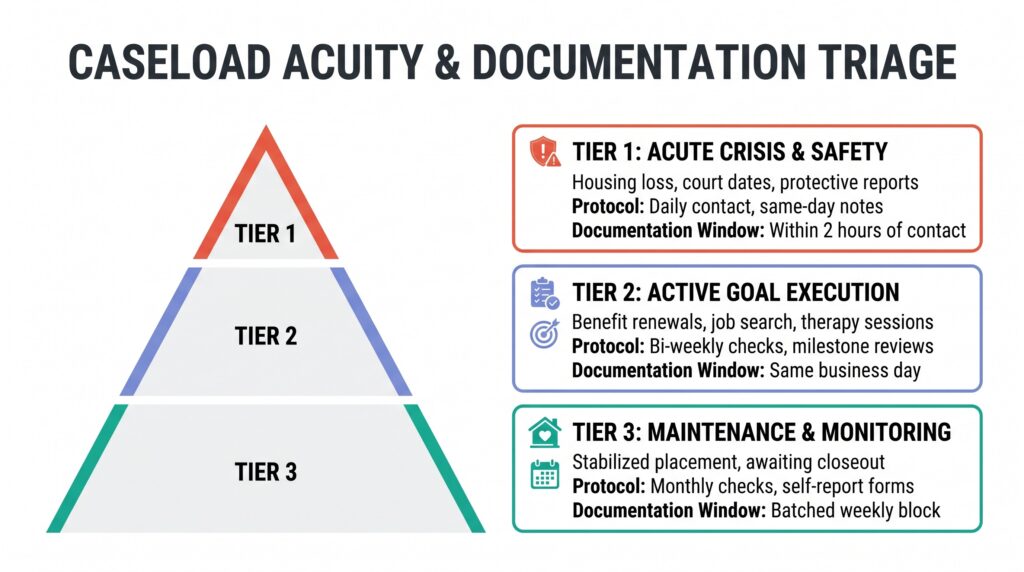
- Tier 1 (Acute Instability & Statutory Deadlines): Clients experiencing active housing loss, protective safety interventions, severe psychiatric decompensation, or upcoming court hearings. These cases require prioritized daily documentation, same-day progress notes, and active supervision reviews.
- Tier 2 (Active Service Coordination & Transition): Stable clients working through active vocational goals, outpatient treatment compliance, or routine benefit recertifications. These interactions follow structured bi-weekly schedules with standardized milestone updates.
- Tier 3 (Maintenance & Monitoring): Stabilized individuals awaiting long-term program discharge or annual reviews. Documentation is limited to structured check-ins and automated self-report forms.
In child welfare agencies, managing high case volume in child welfare requires strict boundaries around Tier 3 communications. Spending forty minutes on an unstructured phone call for a stable placement drains capacity needed for safety investigations. Professional standards established by the National Association of Social Workers emphasize that client documentation must be accurate, timely, and reflective of direct service delivery. When practitioners allow administrative arrears to accumulate for weeks, the accuracy of the clinical narrative deteriorates, creating both ethical vulnerabilities and unnecessary legal liability for the operating agency.
When tackling an existing backlog, apply this triage lens in reverse. Isolate all overdue billing-critical notes first, as billing compliance windows carry strict forfeiture deadlines. Next, clear mandatory statutory filings and court summaries. Conclude with routine collateral contacts. Grouping identical administrative tasks together eliminates task-switching fatigue, allowing caseworkers to process delinquent files in focused, uninterrupted sprints.
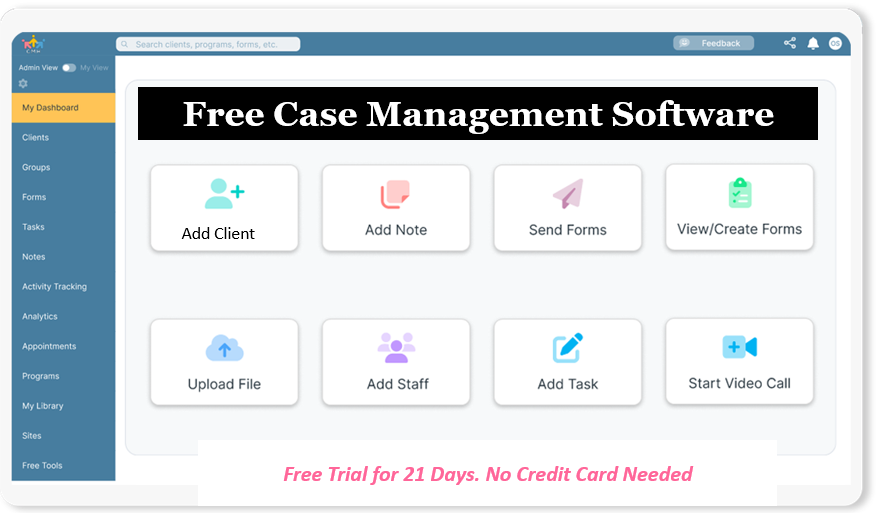
👉 Try it Free - Free Case Management System
What Caseworker Time Management Strategies Eliminate Off-Hours Charting?
Eliminating weekend documentation requires establishing firm operational boundaries during the regular workday. Frontline clinicians often operate in continuous open-door availability, leaving administrative tasks vulnerable to constant interruption. Restructuring the workday around protected documentation sprints restores control.
Non-Negotiable Documentation Time-Blocks
Schedule two dedicated documentation blocks into your calendar every day: twenty minutes before lunch to close morning encounters, and thirty minutes before the end of your shift to finalize afternoon visits. Treat these appointments with the same ethical gravity as a scheduled client meeting or court appearance. Close external email tabs, silence desk phones, and inform colleagues that you are unavailable. When professionals learn how to finish progress notes on time within protected work hours, the chronic dread of evening charting disappears, achieving meaningful social worker documentation burnout prevention.
Concurrent and Collaborative Documentation Workflows
The most effective way to eliminate an evening backlog is to stop leaving documentation until after the client walks out the door. Adopting concurrent documentation best practices social work standards allows caseworkers to document collaboratively during the session. During the final five to eight minutes of an encounter, turn the screen toward the client or review the clinical summary together:
- Verbally verify the client’s stated goals, agreed-upon tasks, and upcoming milestones.
- Enter objective behavioral observations and action items directly into standardized fields while the client participates.
- Validate mutual consensus on next steps before completing the contact.
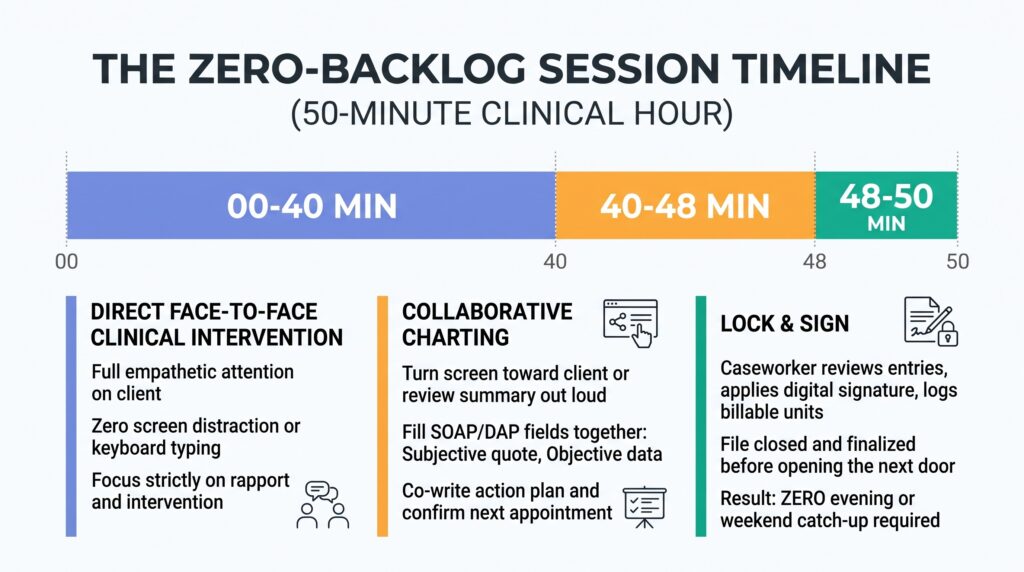
Collaborative charting demystifies the clinical record, strengthens client engagement, and ensures that the note is fully signed and finalized before the next appointment begins.
Lean Clinical Note Construction
Exhaustive narrative paragraphs do not improve clinical quality or audit defense. Auditors look for medical necessity, client presentation, specific professional interventions, and functional response. Guidance from the Substance Abuse and Mental Health Services Administration highlights that clinical progress notes should emphasize functional progress toward individualized treatment goals rather than exhaustive narrative histories. Utilizing standardized DAP frameworks ensures that behavioral health encounters satisfy Medicaid medical necessity requirements while keeping clinical writing times concise.
Transitioning to automated soap note templates for case managers or dap note software with progress tracking replaces open-ended storytelling with focused clinical data. A standard note should capture the subjective report, objective behavioral data, clinical assessment of progress, and concrete treatment plan in four concise bullet points, keeping documentation time under five minutes per client.
All-in-One Case Management Software
Sign Up Today, Free
No credit card needed!
Do You Have a Team? | ||
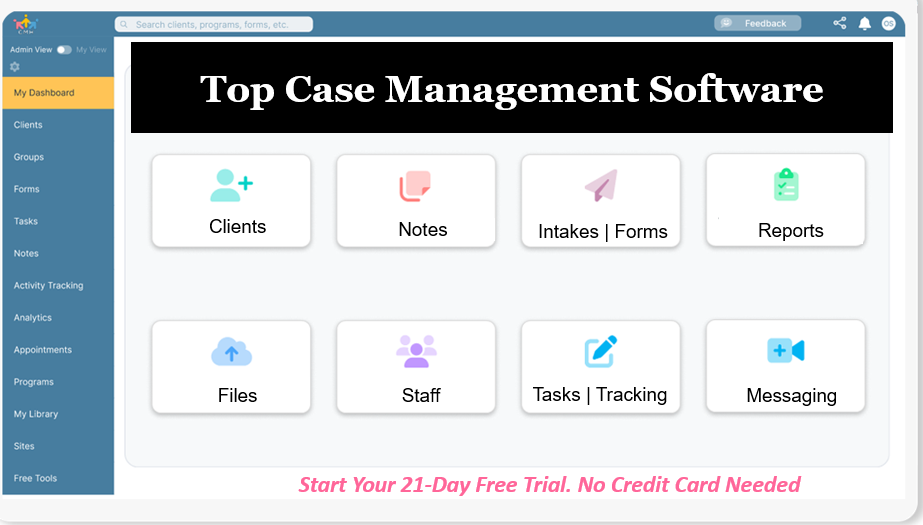
Our best all-in-one client and top case management software simplifies everything from client intake and assessments to programs, projects, goals tracking, planning, scheduling, documentation, reporting dashboard, and progress tracking.
How Digital Tools Streamline Case Backlog Clearance
Manual workflows guarantee administrative backlogs. When caseworkers rely on paper folders, desktop spreadsheets, and static word processors, every client intake requires duplicative data entry across intake logs, client files, and billing sheets. Implementing HIPAA compliant case management software for social workers eliminates manual data re-entry entirely, creating a unified workspace where data entered once populates every clinical and administrative module across the agency.
| Operational Touchpoint | Manual / Paper-Based Workflow | Automated Digital Workflow |
| Client Intake & Registration | Hand-completed paper intake packets manually typed into office spreadsheets | Mobile-responsive online intake forms that automatically generate client profile records upon submission |
| Clinical Progress Notes | Unstructured narrative notes handwritten or typed from scratch late at night | Standardized SOAP and DAP templates with embedded time tracking, clinical dropdowns, and digital signatures |
| Compliance & Deadlines | Manual calendar monitoring and memory leading to missed recertifications | Automated deadline notifications and self-scheduling online appointment booking pages |
| Document Storage & Retrieval | Physical filing cabinets and scattered desktop folders across multiple computers | Unified HIPAA-compliant cloud storage with automated client folders and role-based permissions |
| Funder & Audit Reporting | Days of manual overtime spent cross-referencing paper binders for grant metrics | Single-click export of pre-built demographic, outcome, and attendance reports to Excel and PDF |
Modern case management software resolves operational bottlenecks through five connected workflows:
- Intake Form Automation: Direct-to-profile online forms allow clients or referral partners to complete initial screenings from mobile devices. Intake form automation for social services captures contact data, demographics, and screening baselines directly into the core database, instantly creating the client profile without staff data entry.
- Template-Driven Clinical Progress Notes: Cloud-based electronic clinical progress notes software provides structured checkboxes, behavioral rating fields, and standardized clinical prompts. Caseworkers draft SOAP or DAP entries rapidly, attaching real-time service tracking codes and billing intervals directly inside the active record.
- Automated Compliance Tracking: Instead of tracking recertification deadlines on dry-erase boards or personal desktop calendars, social work case management software with automated reminders tracks renewal windows, mandated review intervals, and pending forms automatically, notifying staff days before an audit deadline occurs.
- Secure Communication Channels: A secure client portal and messaging for caseworkers system keeps client inquiries, assessment requests, and consent documents contained within a single encrypted hub, eliminating fragmented SMS threads and unlogged phone records.
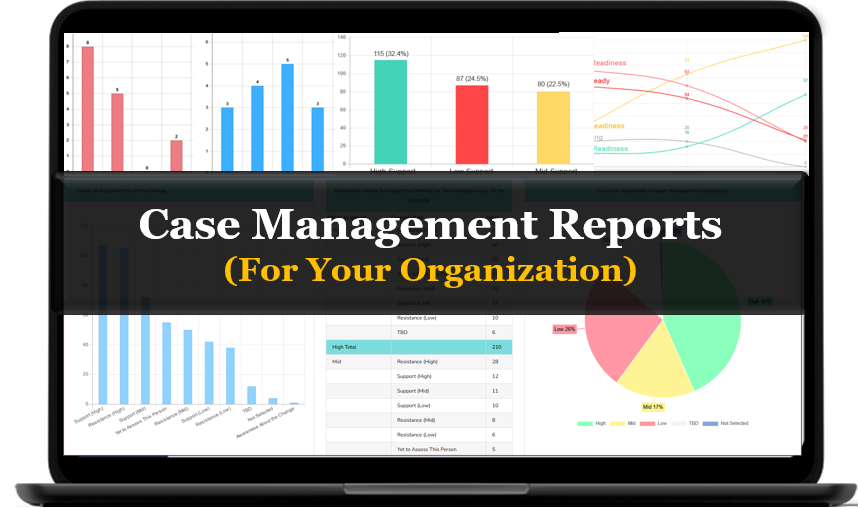
- Supervisory Oversight Dashboards: Clinical supervisors monitor departmental bottlenecks using a centralized caseload management dashboard for clinical supervisors. Leadership can identify unwritten progress entries, track staff service allocations, and rebalance caseload assignments before an individual worker reaches crisis burnout.
Adopting modern digital client tracking software for human services converts administrative paperwork from an exhausting evening chore into an integrated, real-time clinical habit.

People Also Ask
How many cases should a social work case manager carry?
Caseload capacity depends on client acuity, operational complexity, and regulatory mandates. According to standards established by the Council on Social Work Education, intensive crisis and child welfare roles typically recommend 12 to 15 active families, whereas general adult outpatient coordination can range from 25 to 40 cases. Exceeding these limits without automated documentation infrastructure drastically elevates medical errors and staff turnover.
What is the fastest way to catch up on delinquent case notes?
The most efficient recovery method is grouping overdue records by document type rather than client order. Dedicate a protected three-hour administrative block, eliminate digital notifications, and use standardized templates to complete billing notes first, followed by court filings, and finally collateral contacts. This batching workflow eliminates mental fatigue and accelerates record completion.
Is concurrent documentation ethical in clinical social work?
Documenting during or immediately following a session adheres to standard ethical guidelines when executed transparently. Completing notes collaboratively with the client promotes therapeutic transparency, verifies service goals, and ensures factual accuracy while eliminating off-hours charting backlogs.
How do clinical supervisors monitor documentation backlogs?
Supervisors track documentation currency by running automated compliance reports inside centralized agency software. Real-time dashboards highlight unsigned notes, upcoming reassessments, and unbilled service units, allowing supervisors to intervene with operational support before minor delays trigger audit penalties.
What is the difference between SOAP and DAP notes in case management?
SOAP notes categorize clinical information into Subjective, Objective, Assessment, and Plan quadrants, making them ideal for multidisciplinary healthcare and medical social work settings. DAP notes organize data into Description, Assessment, and Plan categories, providing a streamlined format preferred by behavioral health and community social service practitioners.
Can automated case management systems protect client privacy under HIPAA?
Under security rules enforced by the Department of Health and Human Services, modern cloud case management platforms maintain compliance through end-to-end data encryption, strict role-based access permissions, secure client communication portals, and comprehensive audit logs that track every file access, edit, and export event.
Eliminate Backlogs with Case Management Hub
Clearing case backlogs permanently requires replacing fragmented paper tools and disjointed spreadsheets with a unified clinical workspace. Case Management Hub provides human service teams, therapists, and frontline caseworkers with an intuitive, HIPAA-compliant platform designed to streamline daily workflows and protect practitioner well-being.
- Standardized Clinical Notes: Draft compliant SOAP, DAP, and basic progress notes in minutes with built-in time tracking, customizable dropdowns, and digital signature capture.
- Streamlined Intake and Assessments: Distribute secure online intake forms, consent waivers, and standardized screening tools like the PHQ-9 and GAD-7 that instantly populate client profiles and calculate risk trends.
- Centralized Client Tracking: Consolidate demographic records, program assignments, goal milestones, and uploaded documents into a single, searchable client card workspace.
- Supervisory and Funder Analytics: Track team capacity, monitor uncompleted notes, and generate custom grant and demographic reports with single-click PDF and Excel exports.
- Secure Client Engagement: Empower clients to complete assessments, schedule appointments, and communicate safely through a secure client account portal.
Transform your daily administrative routine, eliminate weekend documentation catch-up, and bring your active caseload back into complete balance.
Start Your 21-Day Free Trial (No Credit Card Required)
Frequently Asked Questions
How does Case Management Hub help clinicians manage a high caseload in social work without taking work home?
The platform streamlines every operational touchpoint that typically creates administrative drag. Rather than re-entering intake information from paper clipboards into spreadsheets, online intake forms automatically create client profiles upon submission. Clinical progress notes utilize customizable SOAP and DAP templates with embedded time-tracking timers, allowing clinicians to complete and sign notes immediately following a session in five minutes or less.
How does the platform assist when learning how to catch up on delinquent case notes?
When dealing with an existing documentation backlog, Case Management Hub allows clinicians to filter records by status to immediately identify uncompleted notes or missing assessments. The platform supports batch imports of historical case data and provides rapid-entry templates that enable practitioners to process overdue files efficiently without switching between disparate tools or software applications.
Can agency administrators control staff permissions to maintain HIPAA confidentiality?
Yes. Account owners and administrators can customize role permissions across Account Owner, Admin, Employee, and Support profiles. Permissions can restrict staff access exclusively to assigned clients or assigned program groups, ensuring employees only see the records relevant to their active workload while maintaining complete administrative oversight.
How do automated reminders prevent missed statutory deadlines?
The system features automated reminder engines that monitor intake forms, scheduled appointments, and pending documentation tasks. Clinicians and supervisors receive timely notifications regarding incomplete forms or overdue client assessments, preventing compliance oversights and audit citations before they occur.
Does Case Management Hub support custom reporting for external grant funders?
The platform includes more than 40 pre-built report templates across 11 functional modules, alongside an intuitive custom report builder. Program managers can filter client demographics, service units delivered, and outcome milestone percentages by specific date ranges, exporting publication-ready charts and Excel files for board reviews or grant compliance submissions.
How easy is it to transition an agency to a centralized case management platform free trial?
Onboarding is designed for rapid adoption by non-technical teams. Agencies can activate their workspace instantly without technical implementation delays or software installations. Organizations can import existing client lists and historical progress notes using structured spreadsheets, configure custom fields within minutes, and begin logging client interactions on the same day.
👉 Try it free today - No credit card needed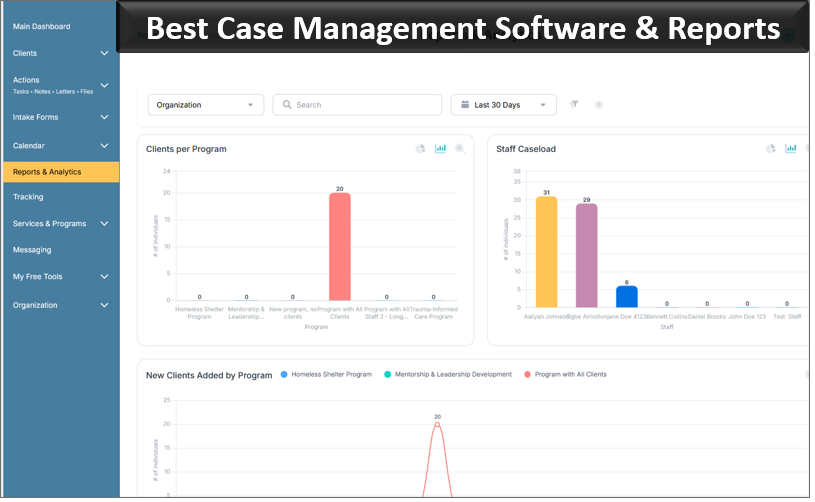
Note: Content on this website (socialworkportal.com) is copyrighted and protected under applicable copyright laws. Unauthorized reproduction, distribution, or use of any content from the website, without explicit written permission, is strictly prohibited. Read: Terms of Use.
Social Work Portal Disclaimer: Social Work Portal is not a social work agency and we do not refer social workers. This web site is provided for educational and informational purposes only and does not constitute providing medical advice or professional social and healthcare services. The information provided should not be used for diagnosing or treating a health problem or disease, and those seeking personal medical advice should consult with ... Read our full disclaimer here: Social Work Portal Disclaimer.