The Modern Social Services Dilemma: Can Technology Restore the Heart of Human Services?
If you entered social work, counseling, or human services management to change lives, chances are you did not anticipate spending hours every afternoon staring at spreadsheets, filing paper intake forms, and chasing down signatures. Administrative overload is one of the leading contributors to workplace stress across the social sector.
According to landmark research from the National Association of Social Workers (NASW), case management duties make up a massive portion of daily workloads, with significant numbers of professionals spending more than half their working hours purely on administrative and case management tasks rather than direct client care.
When human service agencies leverage modern digital tools, the shift is transformative. Implementing an all-in-one human services software platform allows organizations to reclaim valuable hours, eliminate redundant entry, and ensure that sensitive records remain protected. By learning how to automate case management tasks, your agency can transition from reactive paperwork traps to proactive, client-centered care.
Let’s get started
Watch this video:
or
read the guide below.
What Will You Learn from This Guide?
- Administrative Relief: How automating repetitive workflows frees up hours for direct client care.
- Core Software Features: The essential tools needed in a mental health case management system and human services software.
- Feature Comparisons: Traditional manual methods evaluated against specialized automated platforms.
- Selection Criteria: Critical user considerations and decision-making factors for evaluating prospective software.
- Implementation Roadmap: Key steps to adopt modern case management software for social workers without disrupting service delivery.
- ROI & Impact: How streamlining scheduling, notes, and progress tracking elevates organizational outcomes.
💡All-in-one Case Management Software.
Everything in one place: clients, notes, forms, appointments, reports, and outcomes.
👉 Try it Free - No credit card needed
Why Is Workflow Automation Essential for Modern Social Services?
Every hour spent manually transcribing client notes or cross-referencing appointment calendars is an hour lost to direct support, advocacy, and community outreach. Manual operations create operational bottlenecks that directly affect client care quality.
When intake coordinators manually log new clients using paper forms or basic spreadsheets, human error is inevitable. Documents get misfiled, scheduled follow-ups drop off the radar, and clinical supervisors spend excessive time auditing files for compliance.

Adopting automated client onboarding for human services replaces disjointed steps with unified digital pipelines. When a client submits a customizable intake form online, a HIPAA-compliant case management platform instantly generates the client record, assigns an initial task list to an intake coordinator, and schedules the initial assessment. Automating these routine steps speeds up client access to vital resources while preventing staff burnout.
👉 Try it Free - Free Case Management System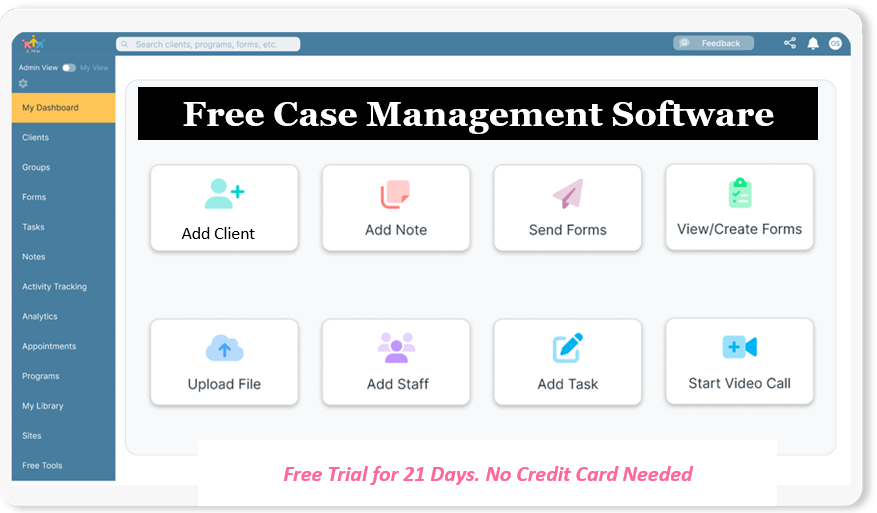
What Key Features Should You Look For in a Case Management Platform?
Selecting the right solution requires understanding how software functionality aligns with daily operational needs. The goal is to replace disconnected programs with a single, streamlined hub.

1. Intake and Scheduling Automation
A core requirement for any social service agency is getting clients onboarded efficiently. Social work intake and scheduling software streamlines this process through:
- Customizable intake forms for social services: Capture essential demographics, medical histories, and service agreements through secure web forms that auto-populate the master record.
- Streamlining appointments and scheduling for mental health counselors: Enable automated client appointment reminders via SMS or email, reducing no-show rates.
2. Documentation and Progress Tracking
Writing session notes and monitoring long-term growth consume a large portion of a clinician’s week. Look for software featuring:
- Automated progress notes and clinical documentation: Use pre-formatted clinical templates (such as SOAP, BIRP, or DAP) that speed up entry while maintaining strict regulatory compliance.
- Best software for tracking client goals and progress: Establish custom milestones, track service plan completion visually, and measure community health outcomes over time.
3. Communication and Data Management
Handling sensitive client information requires robust security frameworks.
- Secure messaging and document storage for case managers: Communicate securely with clients and interdisciplinary teams while storing digital records in a unified vault.
- Centralized client file storage and data management: Ensure seamless permissions management so social services supervisors and clinical supervisors can access records safely without breaching confidentiality boundaries.
4. Operational & Financial Oversight
Administrative efficiency relies on integrated operational and back-office tools:
- Non-profit case management and timekeeping software: Track grant-funded staff hours directly against specific cases or community programs.
- Integrated billing and cost tracking for nonprofits: Simplify claims creation, sliding-scale invoicing, and service expense tracking within a single interface.
How Do Manual Workflows Compare to Automated Systems?
To illustrate the operational advantages, here is a direct comparison between legacy administrative approaches and modern, integrated solutions:
| Operational Area | Manual / Legacy Approach | Automated Case Management Software |
| Client Onboarding | Paper forms, manual data re-entry, delayed file creation | Automated client onboarding for human services via self-service intake portals |
| Appointment Management | Manual phone calls, paper planners, high no-show rates | Social work intake and scheduling software with automated SMS/email reminders |
| Documentation & Notes | Handwritten or disjointed text files, inconsistent compliance | Automated progress notes and clinical documentation with built-in compliance checks |
| Data & File Storage | Physical filing cabinets or fragmented cloud folders | Centralized client file storage and data management with role-based access |
| Communication | Unencrypted emails, fragmented phone tags | Secure messaging and document storage for case managers in a encrypted environment |
| Goal & Outcome Tracking | Manual spreadsheet tallying, difficult program reporting | Best software for tracking client goals and progress with visual outcome analytics |
| Grant & Time Tracking | Separate timesheets, complex funding audits | Non-profit case management and timekeeping software integrated with cost tracking |
What Are the Essential User Considerations and Decision-Making Factors?
Evaluating software involves balancing immediate clinical usability against broad organizational requirements. Key decision factors include:
- User Experience & Ease of Adoption: Human services staff come with varying levels of tech proficiency. The interface must be intuitive so that community health workers, benefits counselors, and victim advocates can navigate client profiles with minimal training.
- HIPAA & Regulatory Compliance: Protecting client confidentiality is non-negotiable. Software must provide robust encryption, audit logs, and signed Business Associate Agreements (BAAs).
- Customization & Flexibility: Every organization handles client management differently. Search for solutions that allow you to adapt intake forms, service plan templates, and workflow triggers without custom coding.
- All-in-One Capabilities: Operating multiple standalone systems for messaging, timekeeping, and billing increases subscription costs and fragments data. Choosing an all-in-one client management software for nonprofits eliminates duplicate record management.
- Reporting and Funder Requirements: Non-profit executives and program directors need quick reporting access to demonstrate measurable outcomes to grantmakers and government agencies.
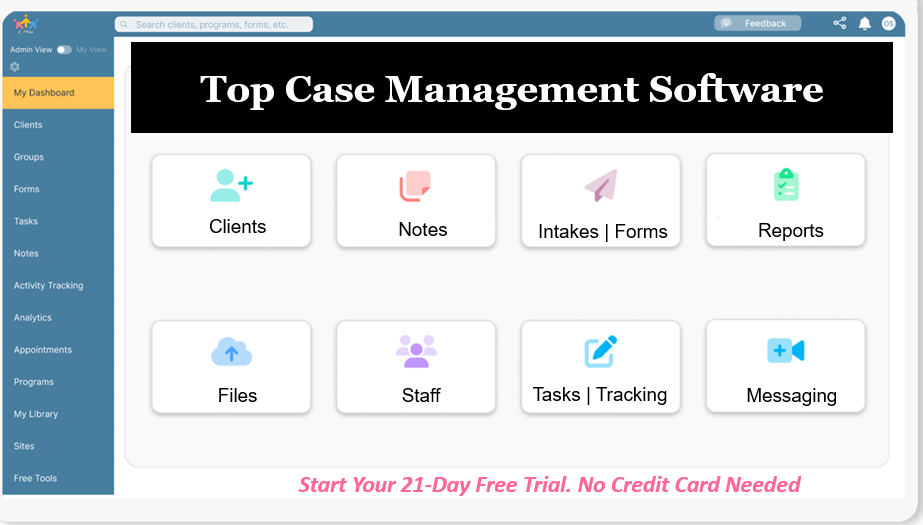
Do You Have a Team? Our best all-in-one client and top case management software simplifies everything from client intake and assessments to programs, projects, goals tracking, planning, scheduling, documentation, reporting dashboard, and progress tracking.All-in-One Case Management Software
Sign Up Today, Free
No credit card needed!
How Can Your Agency Successfully Transition to Automated Software?
Moving to a modern case management platform requires a structured implementation plan to ensure smooth staff adoption and data integrity.
- Audit Current Workflows: Identify administrative bottlenecks in intake, note completion, or billing. Map out which tasks can be automated immediately.
- Involve Key Stakeholders: Bring together clinical supervisors, administrative staff, and frontline case managers early in the selection process to gather actionable feedback.
- Clean Existing Data: Prior to importing legacy data into a centralized client file storage and data management system, purge obsolete records and standardize formatting.
- Phase the Rollout: Launch core features first—such as digital intakes and appointment scheduling—before introducing advanced tools like automated progress notes or integrated billing.
- Establish Continuous Training: Provide ongoing support for staff, ensuring every user feels confident navigating the system in their daily work.
People Also Ask
What is the best software to automate case management workflows?
The best software combines secure documentation, digital intake forms, appointment scheduling, progress tracking, and outcome reporting in a single interface. Look for specialized platforms designed specifically for human services professionals rather than generic CRM tools.
How can social workers reduce administrative burden with software?
Social workers can reduce admin overhead by utilizing automated client intake, digital note templates (like SOAP or BIRP), automated appointment reminders, and centralized file storage, freeing up hours each week for direct service delivery.
What features to look for in human services case management software?
Key features include HIPAA-compliant data storage, customizable intake forms, client progress and goal tracking, secure messaging, automated timekeeping, billing capabilities, and built-in reporting tools for funders.
Is case management software HIPAA-compliant?
Reputable case management software built for human services and health settings offers end-to-end encryption, secure access controls, audit logs, and will sign a Business Associate Agreement (BAA) to ensure strict HIPAA compliance.
How does automated scheduling benefit mental health counselors and case managers?
Automated scheduling reduces no-shows through automated SMS and email reminders, allows clients to complete pre-appointment forms online, and syncs calendar availability across clinical teams automatically.
Can case management platforms track client goals and outcomes?
Yes, modern platforms include goal tracking modules where clinicians can define measurable milestones, track client progress over time, and generate aggregate outcome reports for program evaluation.
Streamline Your Practice with Case Management Hub
Managing case files, client appointments, and documentation shouldn’t consume your entire day. Case Management Hub provides a comprehensive, all-in-one human services software platform tailored to the exact needs of social workers, counselors, and nonprofit professionals.
With intuitive tools for digital intake, goal tracking, progress notes, secure messaging, and reporting, you can minimize administrative friction and focus on supporting your community.
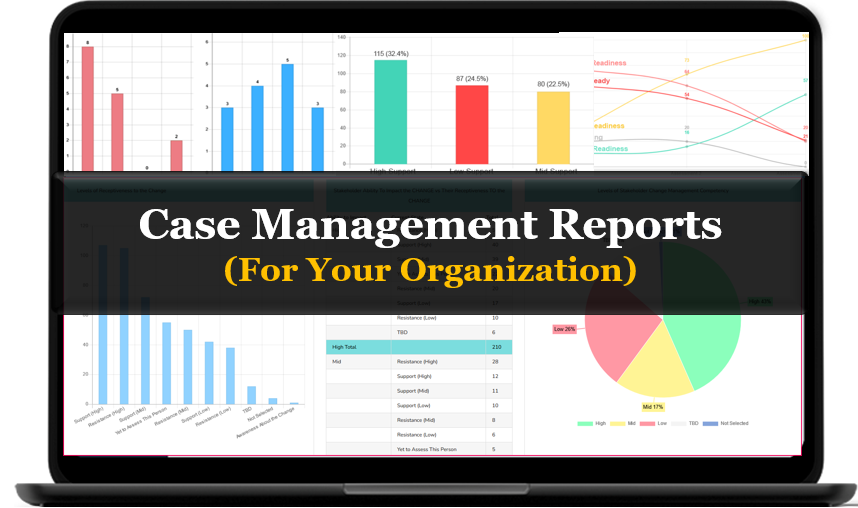
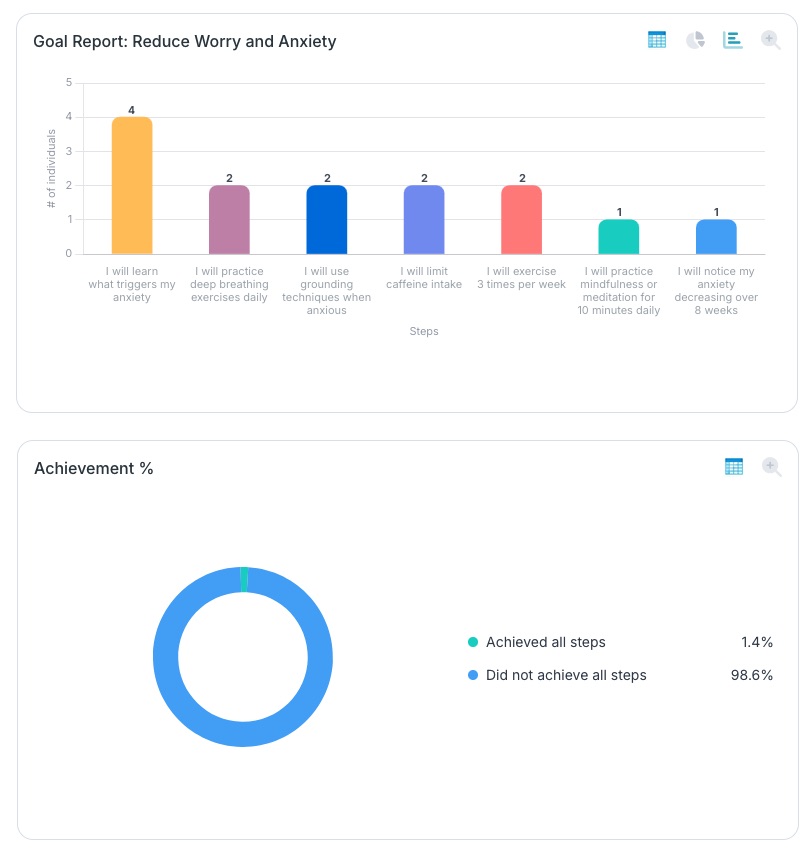
See how easy it is to setup client goals and review progress through a reports dashboard:
Step 1:
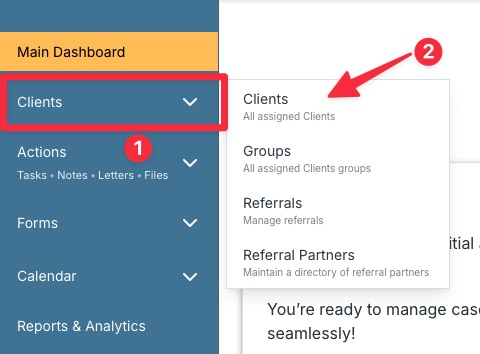
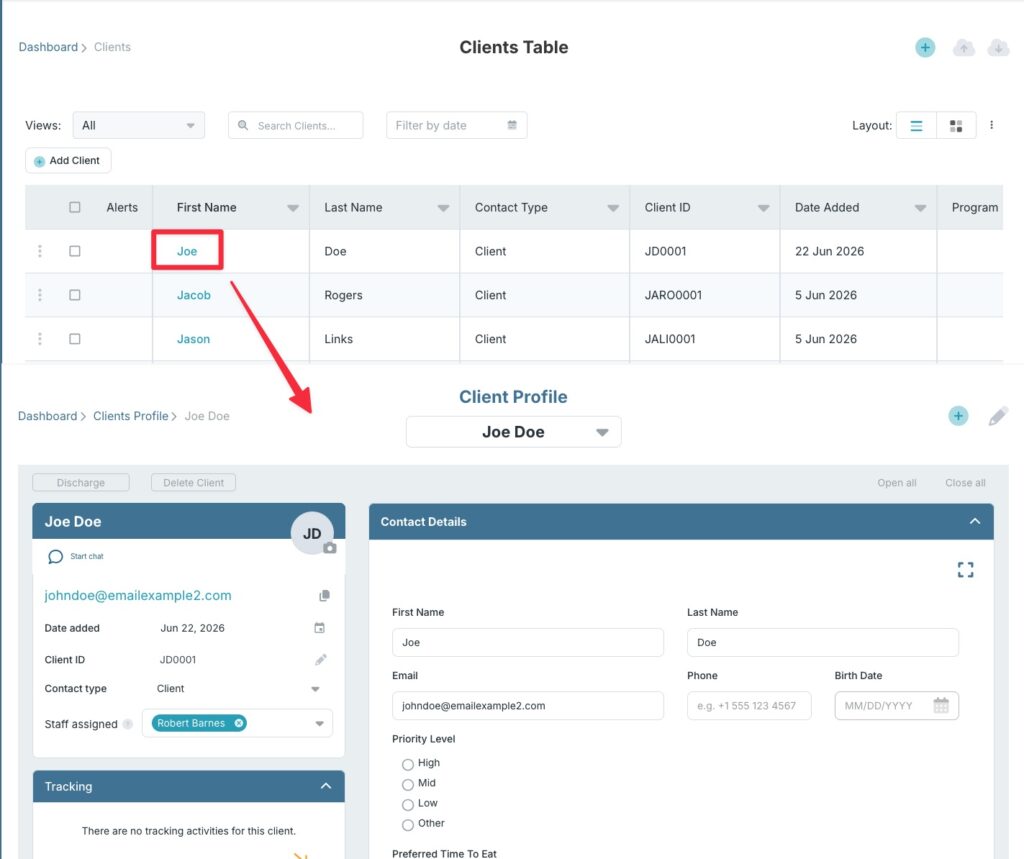
Navigate to the Client’s table and open a client profile.
Step 2:
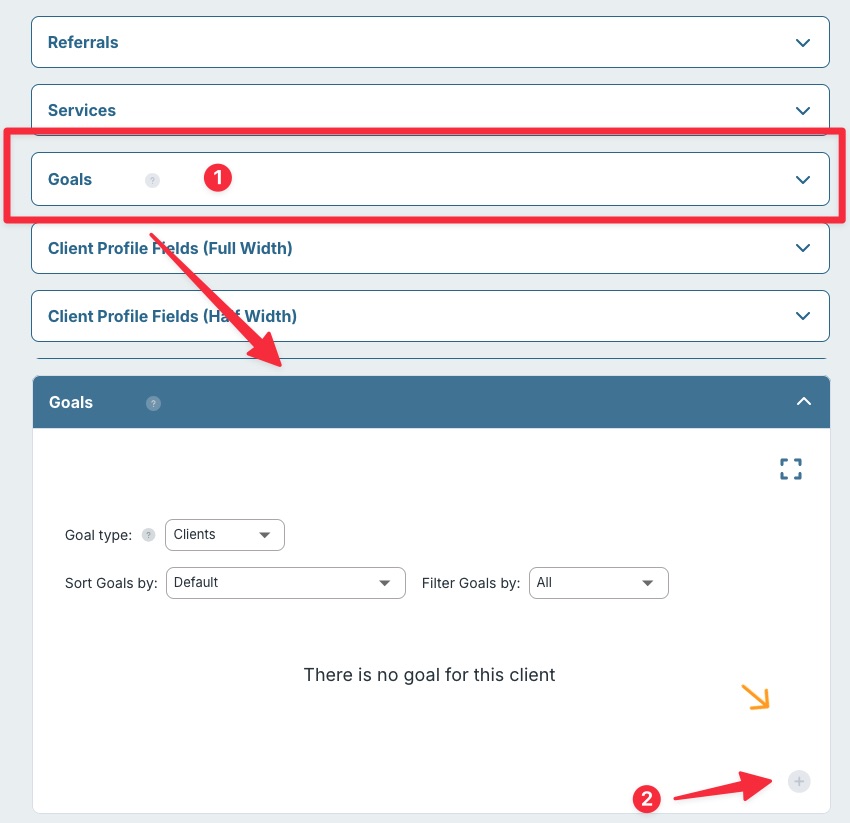
Scroll down to the Goals section and click the title to expand. Click the plus button to create new goal.
Step 3:
Give your goal a name and add in each of the steps required to achieve the goal. Start with the first step and add each subsequent step underneath it. When done, click Save.
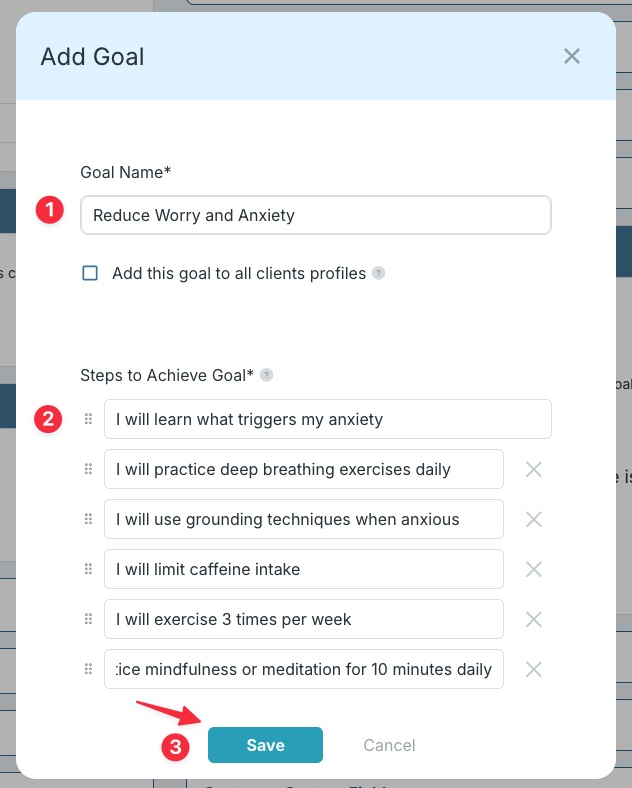
Tip: Goals can added automatically to all clients by placing a checkmark in “Add this goal to all students profiles”.
Step 4:
From the Goals section, you can manually mark steps as done, sort goals by date added, and filter out pending, in-progress, or completed goals.
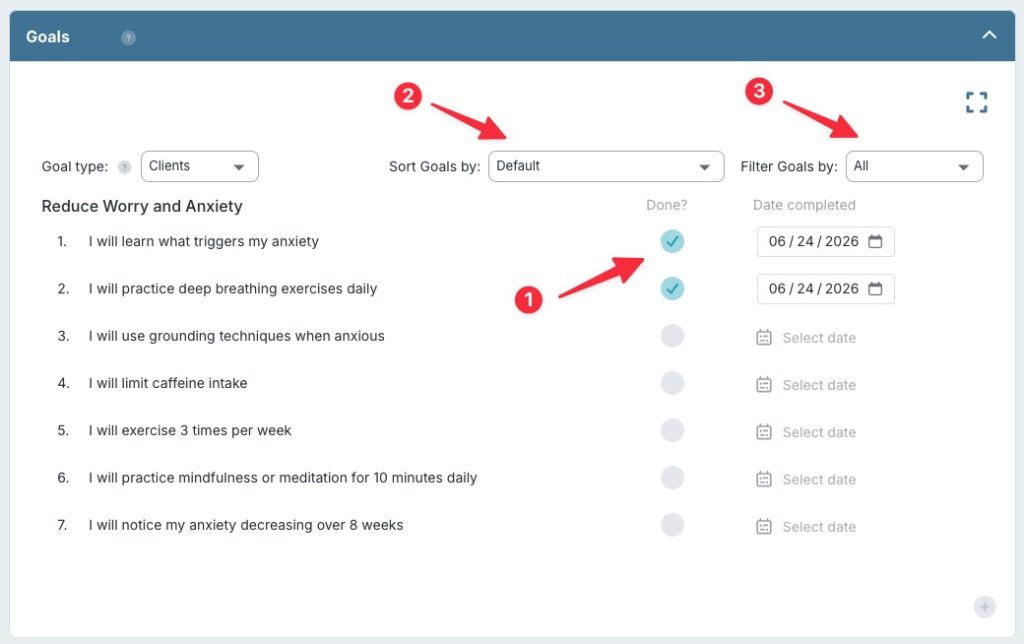
Tip: As you mark goals as done, the date completed field will automatically be filled in with today’s date, however you can change this by simply clicking on it and selecting the new date.
Step 5:
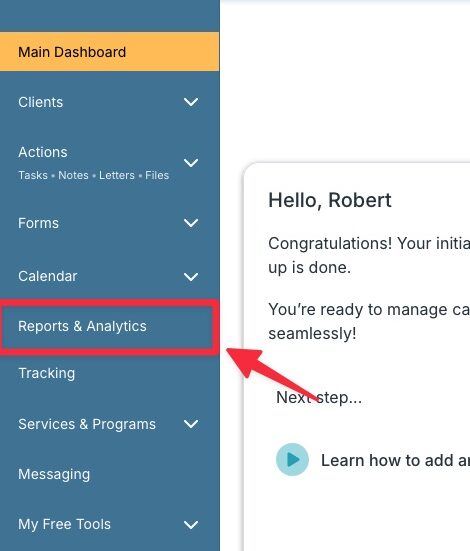
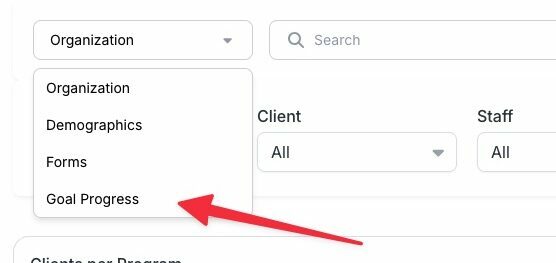
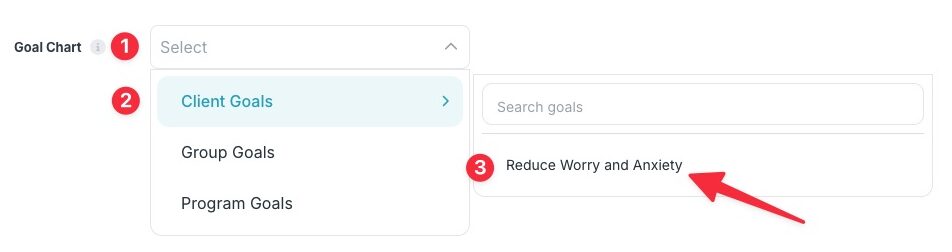
Review goal progress by heading to the Reports and Analytics module, selecting Goal Progress, and then selecting which goals. View reports on how many times a step was marked as done as well as the achievement percentage.
Ready to see how seamless your daily workflow can be? Sign up for a free 21-day trial today—no credit card required.
Frequently Asked Questions
How long does it take to set up an all-in-one case management system?
Most agencies can set up core workflows, create custom intake forms, and onboard staff within a few days. Cloud-based platforms eliminate complex IT infrastructure requirements.
Can non-profit program directors use this software for funder reporting?
Yes. The software features built-in reporting tools that allow program directors to track key performance metrics, client outcomes, and service demographics for grant applications and funder reviews.
How does digital documentation ensure compliance during clinical audits?
Automated clinical templates ensure all required fields, signatures, dates, and progress metrics are completed properly before notes are locked, creating an audit-ready digital record.
Can administrative staff control user permissions for sensitive records?
Yes. Role-based permission controls allow supervisors to dictate exactly who can view, edit, or manage specific client files, keeping sensitive details fully protected.
Does the software support timekeeping for grant-funded positions?
Integrated timekeeping and cost tracking features allow staff to log client contact hours against specific grant programs or administrative activities.
Is training required for frontline staff to use case management tools?
Because modern platforms feature clean, intuitive interfaces, most frontline case managers and community health workers can master daily navigation after a brief orientation.
👉 Try it free today - No credit card needed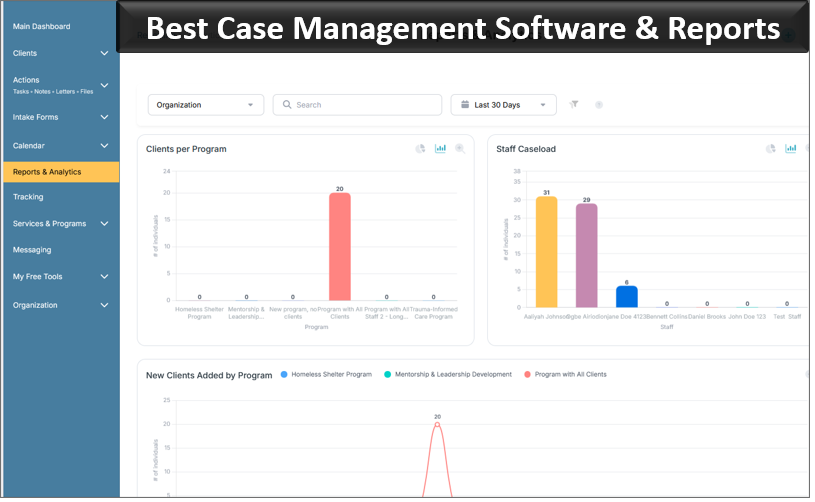
Note: Content on this website (socialworkportal.com) is copyrighted and protected under applicable copyright laws. Unauthorized reproduction, distribution, or use of any content from the website, without explicit written permission, is strictly prohibited. Read: Terms of Use.
Social Work Portal Disclaimer: Social Work Portal is not a social work agency and we do not refer social workers. This web site is provided for educational and informational purposes only and does not constitute providing medical advice or professional social and healthcare services. The information provided should not be used for diagnosing or treating a health problem or disease, and those seeking personal medical advice should consult with ... Read our full disclaimer here: Social Work Portal Disclaimer.