
Best SimplePractice Alternative for Community Mental Health Programs
Community mental health programs need software that can manage far more than therapy appointments and clinical notes. Teams often coordinate intake, behavioral health assessments, treatment plans, case management, referrals, crisis support, community services, client billing, reporting, and follow-up activities across multiple providers and locations.
SimplePractice can be a useful platform for individual therapists and smaller private practices. However, community mental health organizations frequently need broader case management, care coordination, program reporting, and multidisciplinary collaboration capabilities.
Case Management Hub is a strong SimplePractice alternative for community mental health programs because it combines client management, behavioral health documentation, case management, referrals, billing, outcome tracking, and multi-program reporting in one centralized platform.

Why Community Mental Health Programs Outgrow SimplePractice
Community mental health programs often serve clients with complex clinical, social, financial, housing, and care coordination needs. These services typically involve more than one provider and may continue over an extended period.
Common reasons organizations look for a SimplePractice alternative include:
- Managing therapists, case managers, care coordinators, peer specialists, and intake staff in one system
- Tracking clinical and nonclinical services together
- Creating customized behavioral health assessments and documentation templates
- Coordinating referrals to housing, healthcare, substance use, employment, and community resources
- Managing multiple programs, funding sources, and service locations
- Tracking client goals, treatment progress, and program outcomes
- Generating reports for leadership, funders, government agencies, and compliance teams
- Managing client billing and payment information alongside case records
- Replacing spreadsheets, paper files, and disconnected software
- Supporting larger caseloads and multidisciplinary teams
A community mental health platform should support the full client journey, from initial contact and assessment through treatment, referrals, case coordination, progress monitoring, and discharge.
💡All-in-one Case Management Software.
Everything in one place: clients, notes, forms, appointments, reports, and outcomes.
👉 Try it Free - No credit card needed
What Community Mental Health Software Should Include
The best community mental health software should help clinical and support teams work together while protecting sensitive client information and reducing administrative work.
Important features to evaluate include:
- Centralized client and case records
- Digital intake forms and eligibility screenings
- Custom behavioral health assessments
- Progress notes, case notes, and clinical documentation
- Treatment plans, care plans, and service plans
- Goal and outcome tracking
- Referral and community partner management
- Appointment scheduling and reminders
- Client billing and payment tracking
- Secure client portal access
- Document and file management
- Task assignments and recurring follow-ups
- Program and service tracking
- Custom reports and analytics dashboards
- Multi-location and multi-program support
- Role-based permissions
- Mobile-friendly access
- HIPAA-ready data security
The platform should also be flexible enough to support different documentation requirements across counseling, psychiatric, case management, peer support, crisis intervention, and community outreach services.
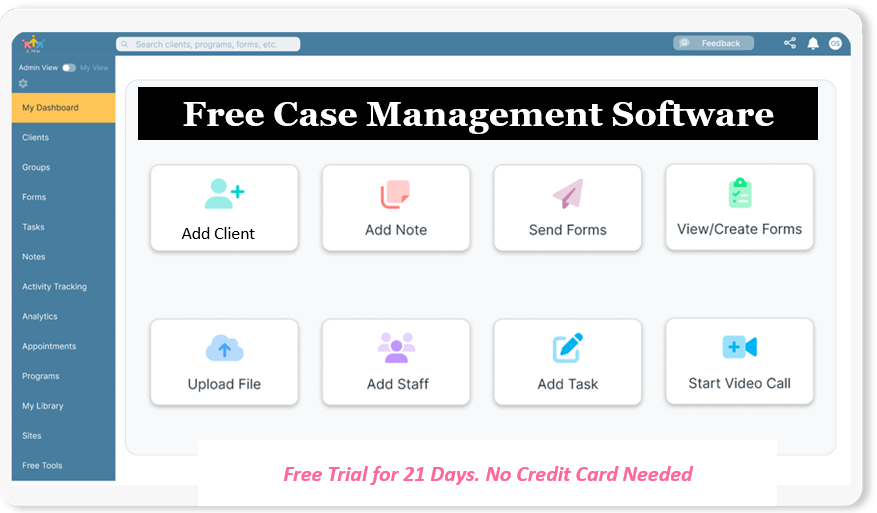
👉 Try it Free - Free Case Management System
Why Case Management Hub Is the Best SimplePractice Alternative for Community Mental Health Programs
Case Management Hub is designed for organizations that manage complex client services across clinical, behavioral health, social service, and community-based programs.
Unlike software focused primarily on private therapy practices, Case Management Hub supports multidisciplinary teams and broader care coordination workflows. Community mental health providers can manage clinical documentation, client services, referrals, billing, reporting, and program operations within one platform.
Key capabilities include:
- Complete client and case management
- Custom intake forms and assessments
- Progress notes and case notes
- Treatment plans, care plans, and service plans
- Individual and program goal tracking
- Client billing and payment tracking
- Appointment scheduling and reminders
- Referral and partner management
- Client portal access
- Secure document storage
- Task management and recurring reminders
- Service, activity, and time tracking
- Custom reports and analytics
- Multiple programs, groups, and locations
- Role-based staff permissions
- Mobile-responsive access
- HIPAA-ready security and data protection
This makes Case Management Hub a practical choice for community mental health centers, nonprofit clinics, behavioral health agencies, substance use programs, social work teams, integrated care programs, and organizations combining clinical treatment with community support.
🔥Still using spreadsheets for case management?
Switch to an all-in-one case management platform.
👉 Try it Free - No credit card needed
Centralized Client and Case Management
Community mental health teams need a complete view of each client. When assessments, notes, referrals, appointments, documents, and service records are stored in different systems, staff may struggle to locate accurate information.
Case Management Hub centralizes information within the client profile so authorized team members can access relevant records without relying on spreadsheets, email threads, shared drives, or paper files.
Client profiles can include:
- Contact and demographic information
- Program enrollment
- Assigned therapists and case managers
- Clinical and psychosocial assessments
- Treatment and service plans
- Progress notes and case notes
- Appointments and tasks
- Goals and progress
- Referrals and community providers
- Documents and uploaded files
- Billing and payment activity
- Discharge information
Centralized records improve continuity of care and reduce the risk of important information being overlooked.
All-in-One Case Management Software
Sign Up Today, Free
No credit card needed!
Do You Have a Team? | ||
Our best all-in-one client and top case management software simplifies everything from client intake and assessments to programs, projects, goals tracking, planning, scheduling, documentation, reporting dashboard, and progress tracking.
Custom Behavioral Health Assessments and Forms
Community mental health programs often use different assessments based on the population served, funding requirements, treatment model, and level of care.
Case Management Hub allows organizations to create and customize forms such as:
- Client intake forms
- Psychosocial assessments
- Mental health screenings
- Risk and safety assessments
- Substance use assessments
- Social determinants of health screenings
- Treatment plans
- Care coordination plans
- Consent and release forms
- Progress reviews
- Discharge assessments
- Client satisfaction surveys
Forms can include signature fields, file uploads, rating scales, custom questions, and fields that map information directly into the client profile.
Create a Free Trial Account Today and Add Your Team to Try the Platform for Free
Get your entire team on board for free in minutes. Work smarter, not harder - free for 21 days. No credit card needed. If you decide to move forward is when you can subscribe.Follow These 5 Simple Steps:
Step 1: Create your free trial account here: Create Account.
Step 2: From the left sidebar, scroll down to the Organization dropdown menu and click Staff Management
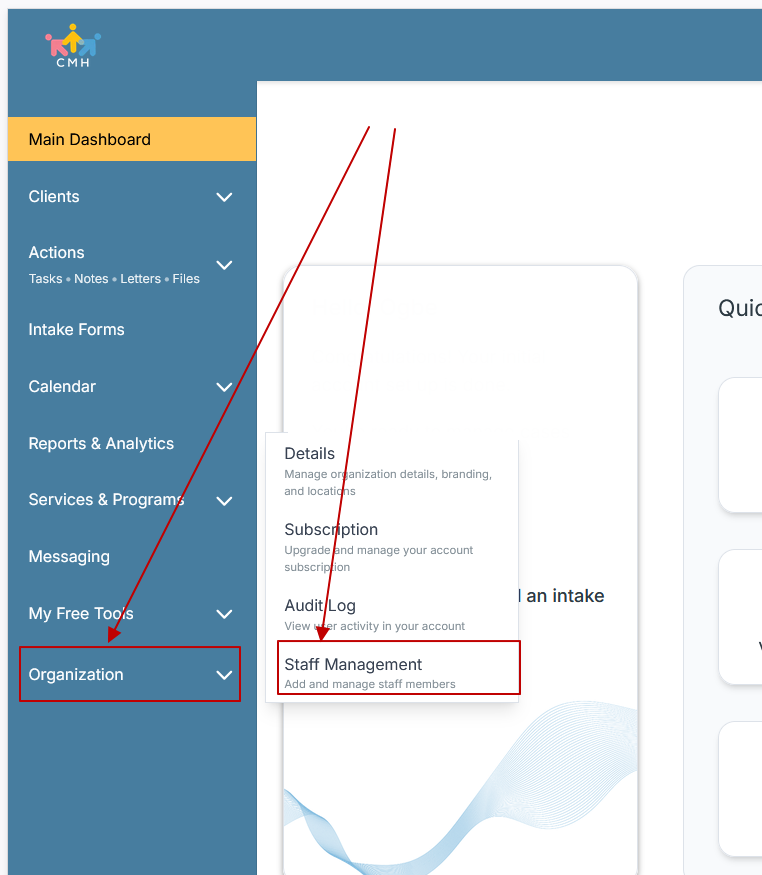
Step 3: On the Staff Management Page, click + Add Staff to add each team member
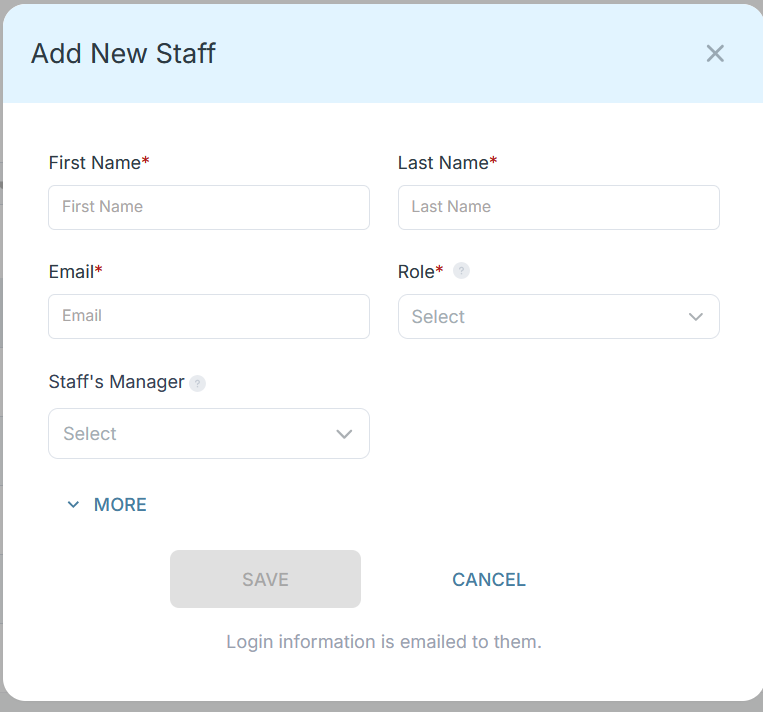
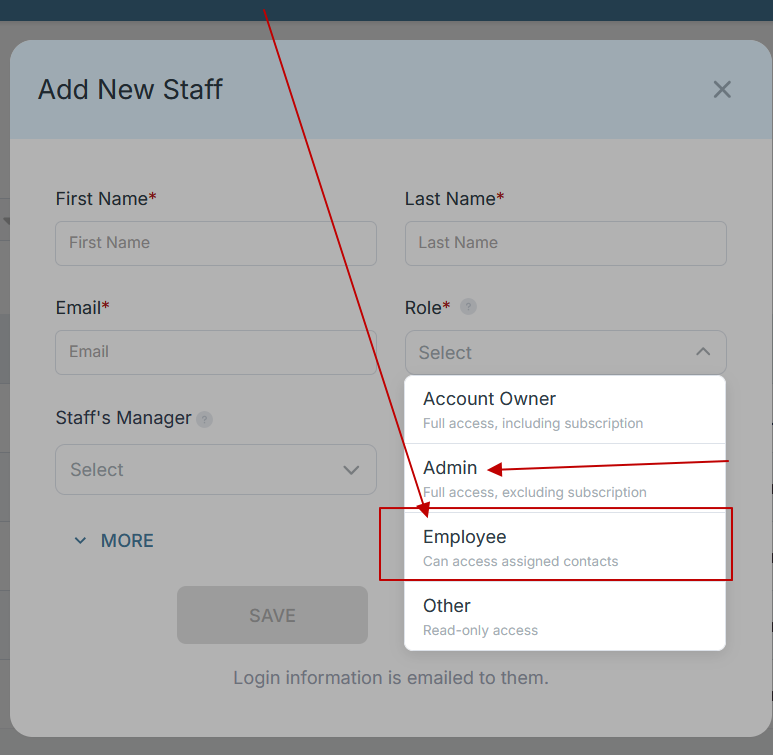
Step 4: Copy and send this email to your team members (so they know how to log in).
⚠️ Important: Ask your team members not to create new accounts. They should log in using the details you create for them.
Email Template to Send Your Team
Subject: You’ve been added to our new All-in-One Case Management tool!
Hi Team,
I've set up a free trial account for our team with the Case Management Hub software, an all-in-one case management software. I've already added you to the account, so you can start exploring immediately.
Please don't create a new account. Instead, use the login details I've shared with you to access the platform here: https://app.casemanagementhub.org/
This platform centralizes and improves everything we do, from case management, standardized assessment forms, client care, scheduling & appointments, reporting & analytics, and more all in one secure, collaborative tool. We have 21 days to test it out for free and see how it fits our needs.
Learn more about the platform here: Explore Features
Looking forward to exploring this together.
Best,
[Your Name/Signature]
Step 5: Request a customized discounted quote.
Treatment Planning and Goal Tracking
Effective community mental health care requires clear treatment goals, measurable steps, responsible staff members, and regular progress reviews.
Case Management Hub allows teams to create goals for individual clients, groups, or programs. Goals can be divided into steps and tracked through completion.
Teams can use goal tracking for:
- Symptom management
- Treatment participation
- Medication adherence
- Housing stability
- Employment readiness
- Independent living skills
- Recovery planning
- Family engagement
- Care coordination follow-ups
- Program completion
Progress data can also support outcome reporting and help providers evaluate whether services are producing meaningful improvements.
Case Management and Care Coordination
Many community mental health clients receive services from several providers. Without coordinated case management, clients may experience duplicated services, missed referrals, incomplete follow-ups, or gaps in care.
Case Management Hub helps teams coordinate:
- Therapy and counseling
- Psychiatric services
- Primary healthcare
- Substance use treatment
- Housing assistance
- Employment and education services
- Benefits coordination
- Peer support
- Transportation and community resources
- Crisis and follow-up services
Staff can assign tasks, schedule reminders, document interactions, and track referrals so responsibilities remain clear across the care team.
Referral Management for Community Mental Health Services
Referral coordination is a central part of community mental health care. Clients may need services from hospitals, medical providers, housing agencies, substance use programs, legal aid organizations, schools, or government programs.
Case Management Hub supports incoming and outgoing referral tracking so organizations can document:
- Referral source
- Receiving organization
- Services requested
- Referral status
- Required documents
- Follow-up activity
- Referral outcomes
Referral records can remain connected to the client profile, helping staff understand which services have been requested, completed, or still require follow-up.
Create a Free Trial Account Today and Add Your Team to Try the Platform for Free
Get your entire team on board for free in minutes. Work smarter, not harder - free for 21 days. No credit card needed. If you decide to move forward is when you can subscribe.Follow These 5 Simple Steps:
Step 1: Create your free trial account here: Create Account.
Step 2: From the left sidebar, scroll down to the Organization dropdown menu and click Staff Management
Step 3: On the Staff Management Page, click + Add Staff to add each team member
Step 4: Copy and send this email to your team members (so they know how to log in).
⚠️ Important: Ask your team members not to create new accounts. They should log in using the details you create for them.
Email Template to Send Your Team
Subject: You’ve been added to our new All-in-One Case Management tool!
Hi Team,
I've set up a free trial account for our team with the Case Management Hub software, an all-in-one case management software. I've already added you to the account, so you can start exploring immediately.
Please don't create a new account. Instead, use the login details I've shared with you to access the platform here: https://app.casemanagementhub.org/
This platform centralizes and improves everything we do, from case management, standardized assessment forms, client care, scheduling & appointments, reporting & analytics, and more all in one secure, collaborative tool. We have 21 days to test it out for free and see how it fits our needs.
Learn more about the platform here: Explore Features
Looking forward to exploring this together.
Best,
[Your Name/Signature]
Step 5: Request a customized discounted quote.
Client Billing and Payment Tracking
Community mental health organizations may manage client fees, program charges, service costs, grants, donations, and other financial activity.
Case Management Hub allows teams to record and track:
- Client payments
- Program fees
- Service costs
- Outstanding amounts
- Funding allocations
- Time and activity records
- Financial tracking categories
Billing and tracking data can be connected to clients and exported for additional financial analysis or external accounting workflows.
Reporting and Outcome Measurement
Community mental health programs need accurate data to monitor service quality, demonstrate impact, support funding requests, and meet reporting obligations.
Case Management Hub can help organizations report on:
- Clients served
- Client demographics
- Program enrollment
- Services delivered
- Appointments and encounters
- Referrals and referral sources
- Client goals and progress
- Assessment results
- Program outcomes
- Discharge reasons
- Staff activity and caseloads
- Billing and payment information
Custom reports allow organizations to focus on the data points that matter to specific programs, contracts, grants, or service models.
Multi-Program and Multi-Location Support
Community mental health organizations frequently operate several programs across multiple offices, clinics, schools, shelters, or community sites.
Case Management Hub allows organizations to:
- Assign clients to one or more programs
- Track services by program
- Organize clients by location
- Restrict staff access by role or assignment
- Create program-specific forms and templates
- Generate reports for individual programs or the entire organization
- Maintain one client record across several services
This flexibility helps reduce duplicate client records and gives leadership a clearer view of organization-wide services and outcomes.
Secure Collaboration Across Multidisciplinary Teams
Community mental health programs may include therapists, counselors, psychiatrists, nurses, social workers, case managers, care coordinators, peer specialists, intake staff, and administrators.
Role-based permissions allow organizations to control which information each user can view or edit. Staff members can be limited to assigned clients, specific programs, or designated responsibilities.
This supports collaboration while helping protect sensitive behavioral health information from unauthorized access.
Create a Free Trial Account Today and Add Your Team to Try the Platform for Free
Get your entire team on board for free in minutes. Work smarter, not harder - free for 21 days. No credit card needed. If you decide to move forward is when you can subscribe.Follow These 5 Simple Steps:
Step 1: Create your free trial account here: Create Account.
Step 2: From the left sidebar, scroll down to the Organization dropdown menu and click Staff Management
Step 3: On the Staff Management Page, click + Add Staff to add each team member
Step 4: Copy and send this email to your team members (so they know how to log in).
⚠️ Important: Ask your team members not to create new accounts. They should log in using the details you create for them.
Email Template to Send Your Team
Subject: You’ve been added to our new All-in-One Case Management tool!
Hi Team,
I've set up a free trial account for our team with the Case Management Hub software, an all-in-one case management software. I've already added you to the account, so you can start exploring immediately.
Please don't create a new account. Instead, use the login details I've shared with you to access the platform here: https://app.casemanagementhub.org/
This platform centralizes and improves everything we do, from case management, standardized assessment forms, client care, scheduling & appointments, reporting & analytics, and more all in one secure, collaborative tool. We have 21 days to test it out for free and see how it fits our needs.
Learn more about the platform here: Explore Features
Looking forward to exploring this together.
Best,
[Your Name/Signature]
Step 5: Request a customized discounted quote.
Who Should Choose Case Management Hub?
Case Management Hub may be the best SimplePractice alternative for community mental health programs that:
- Need both therapy practice management and case management
- Coordinate clinical and community-based services
- Employ multidisciplinary teams
- Require custom assessments, notes, and treatment plans
- Manage referrals to external providers and community partners
- Operate multiple programs or locations
- Need stronger reporting and outcome tracking
- Want client billing and payment tracking within the same platform
- Have outgrown spreadsheets or disconnected software
- Need a scalable platform for growing caseloads and services
Choosing software that supports the full client journey can help community mental health programs improve care coordination, reduce administrative work, strengthen reporting, and deliver more consistent services across every program.
Create a Free Trial Account Today and Add Your Team to Try the Platform for Free
Get your entire team on board for free in minutes. Work smarter, not harder - free for 21 days. No credit card needed. If you decide to move forward is when you can subscribe.Follow These 5 Simple Steps:
Step 1: Create your free trial account here: Create Account.
Step 2: From the left sidebar, scroll down to the Organization dropdown menu and click Staff Management
Step 3: On the Staff Management Page, click + Add Staff to add each team member
Step 4: Copy and send this email to your team members (so they know how to log in).
⚠️ Important: Ask your team members not to create new accounts. They should log in using the details you create for them.
Email Template to Send Your Team
Subject: You’ve been added to our new All-in-One Case Management tool!
Hi Team,
I've set up a free trial account for our team with the Case Management Hub software, an all-in-one case management software. I've already added you to the account, so you can start exploring immediately.
Please don't create a new account. Instead, use the login details I've shared with you to access the platform here: https://app.casemanagementhub.org/
This platform centralizes and improves everything we do, from case management, standardized assessment forms, client care, scheduling & appointments, reporting & analytics, and more all in one secure, collaborative tool. We have 21 days to test it out for free and see how it fits our needs.
Learn more about the platform here: Explore Features
Looking forward to exploring this together.
Best,
[Your Name/Signature]
Step 5: Request a customized discounted quote.
FAQ: Best SimplePractice Alternative for Community Mental Health Programs
What is the best SimplePractice alternative for community mental health programs?
The best SimplePractice alternative for community mental health programs should support case management, behavioral health documentation, referrals, billing, treatment planning, outcome tracking, and multi-program reporting. Case Management Hub combines these capabilities in one centralized platform.
What features should community mental health software include?
Community mental health software should include digital intake forms, assessments, progress notes, treatment plans, care coordination, referral management, scheduling, billing, client portals, secure documents, reporting dashboards, and role-based permissions.
Why do community mental health programs need case management software?
Community mental health programs need case management software to coordinate therapists, case managers, peer specialists, and support staff while tracking services, referrals, client progress, appointments, outcomes, and program requirements in one system.
Why is Case Management Hub best for community mental health programs?
Case Management Hub is best for community mental health programs because it combines behavioral health documentation, case management, referrals, billing, custom assessments, treatment plans, outcome tracking, and multi-location support in one flexible platform.
Can Case Management Hub support multidisciplinary behavioral health teams?
Yes. Case Management Hub supports therapists, counselors, social workers, case managers, care coordinators, peer specialists, intake teams, and administrators with centralized client records, task management, role-based access, and collaborative care workflows.
Note: Content on this website (socialworkportal.com) is copyrighted and protected under applicable copyright laws. Unauthorized reproduction, distribution, or use of any content from the website, without explicit written permission, is strictly prohibited. Read: Terms of Use.
Social Work Portal Disclaimer: Social Work Portal is not a social work agency and we do not refer social workers. This web site is provided for educational and informational purposes only and does not constitute providing medical advice or professional social and healthcare services. The information provided should not be used for diagnosing or treating a health problem or disease, and those seeking personal medical advice should consult with ... Read our full disclaimer here: Social Work Portal Disclaimer.