
All-in-One Case Management Software
for Social Workers, Nonprofits, Therapists, Case Managers Social and Human Services
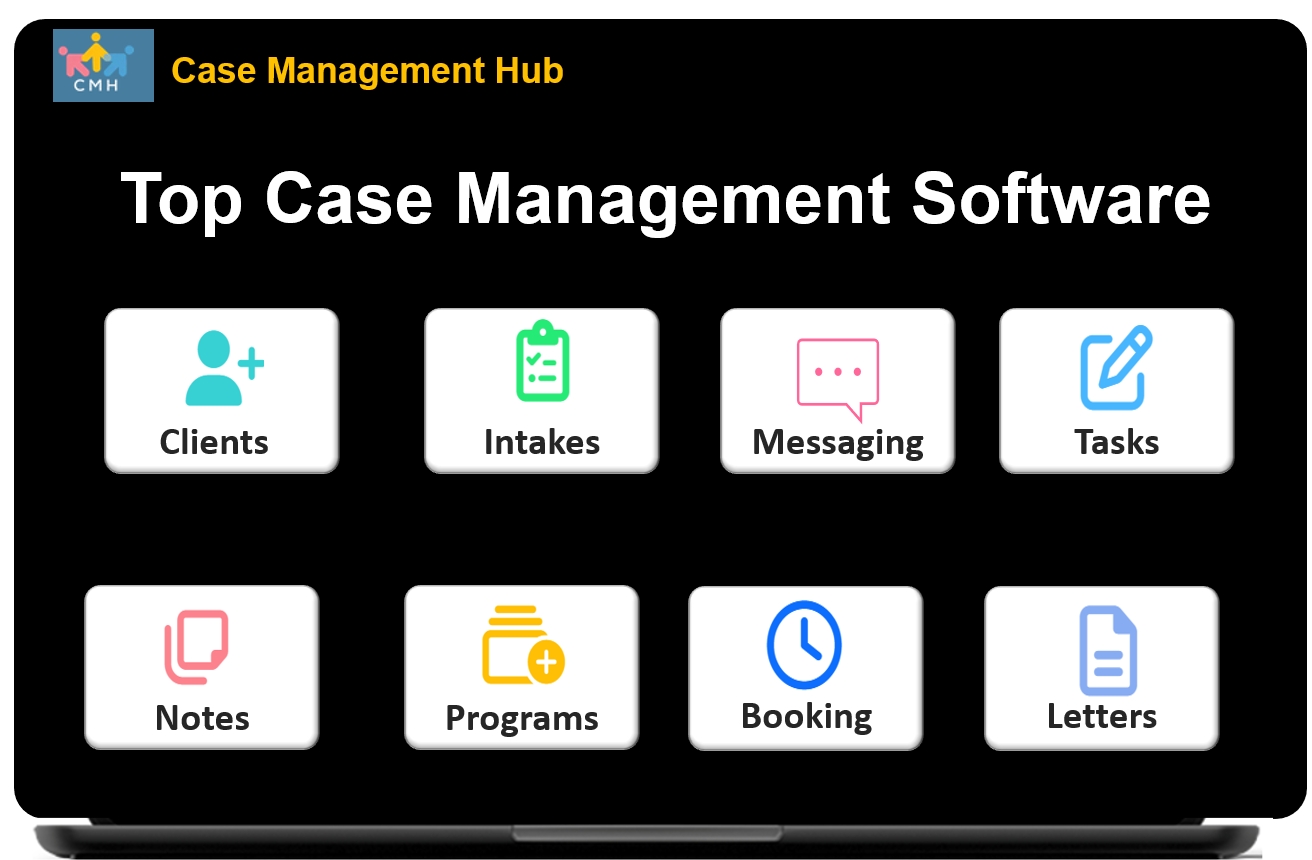
Case Management Hub is an all-in-one social services, human services, therapy practice, nonprofit manager, and healthcare case management software platform built for organizations that need to centralize client data, simplify documentation, improve reporting, and support staff across one secure system.
Whether you serve individuals, families, patients, students, residents, or program participants, this all-in-one case management system helps social workers, therapists, counselors, case managers, nonprofits, and human services teams reduce administrative burden and deliver more consistent care. It is designed to bring intake, forms, notes, tasks, scheduling, referrals, files, goal tracking, and reporting into one easy-to-use platform.
Why Organizations Choose This Case Management System
Many agencies outgrow spreadsheets, paper files, disconnected folders, and generic databases. They need a case management system that is simple enough for daily use and powerful enough to support growth. Case Management Hub helps organizations replace manual processes with a centralized cloud-based platform that supports client management, social work documentation, therapist workflows, nonprofit reporting, and team collaboration.
- Centralized client records, case notes, assessments, tasks, referrals, and files
- Easy-to-use interface for both tech-savvy and non-technical staff
- Flexible features for nonprofits, therapy practices, social service teams, and multi-program agencies
- Fast onboarding compared to more complex case management software options
- Customizable workflows that support real-world service delivery
Built for Social Workers, Therapists, Case Managers, and Nonprofits
This social work software is built for the professionals and organizations doing the work every day. Case Management Hub supports individual practitioners, private practices, nonprofits, behavioral health teams, community-based organizations, schools, legal service providers, healthcare programs, and large multi-location agencies. It is designed to support both frontline service delivery and the operational teams responsible for compliance, reporting, program oversight, and administration.
Primary Users
- Social workers, counselors, therapists, psychologists, and behavioral health professionals
- Case managers, care coordinators, intake teams, outreach workers, and peer support staff
- Nonprofits, human services agencies, social service organizations, and government programs
- Schools, youth programs, housing providers, reentry teams, and advocacy organizations
- Administrative, billing, compliance, and reporting teams that support service delivery
Because the platform supports multiple organization types and service models, it is a strong fit for agencies that need nonprofit case management software, therapist software, social services software, or a broader case management platform that can scale across programs and locations.
Key Features That Help Teams Work Faster and Smarter
Case Management Hub is designed to reduce time spent on repetitive administrative tasks while improving accuracy, visibility, and coordination. Instead of using separate tools for client forms, notes, tasks, scheduling, and reports, teams can manage their work from one connected case management software platform.
Core Capabilities
- Digital intake forms and mobile-friendly online forms
- Client profiles with custom fields and centralized records
- Progress notes, group notes, and customizable note formats
- Custom forms, assessments, signatures, and mapped profile data
- Task assignment, recurring reminders, and notifications
- Calendar, appointment booking, and reminder tools
- Referral tracking and service partner coordination
- File uploads and document storage
- Goal tracking and outcome monitoring
- Custom reports with export options
These features make it easier for organizations to manage high caseloads, deliver services consistently, and track performance across clients, staff, and programs.
Create a Free Trial Account Today and Add Your Team to Try the Platform for Free
Get your entire team on board for free in minutes. Work smarter, not harder - free for 21 days. No credit card needed. If you decide to move forward is when you can subscribe.Follow These 5 Simple Steps:
Step 1: Create your free trial account here: Create Account.
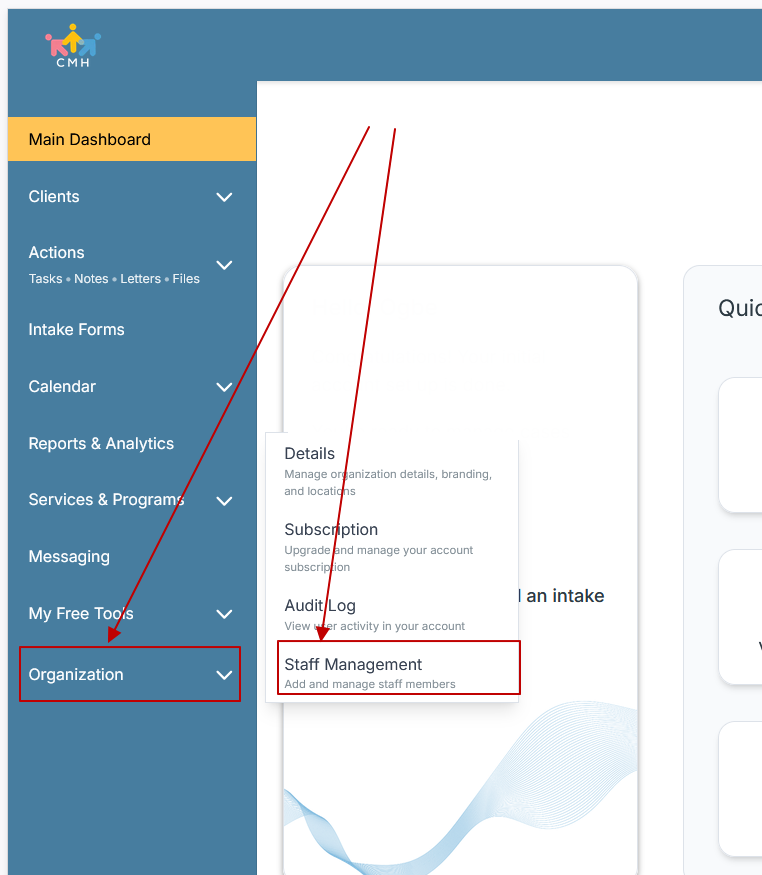
Step 2: From the left sidebar, scroll down to the Organization dropdown menu and click Staff Management
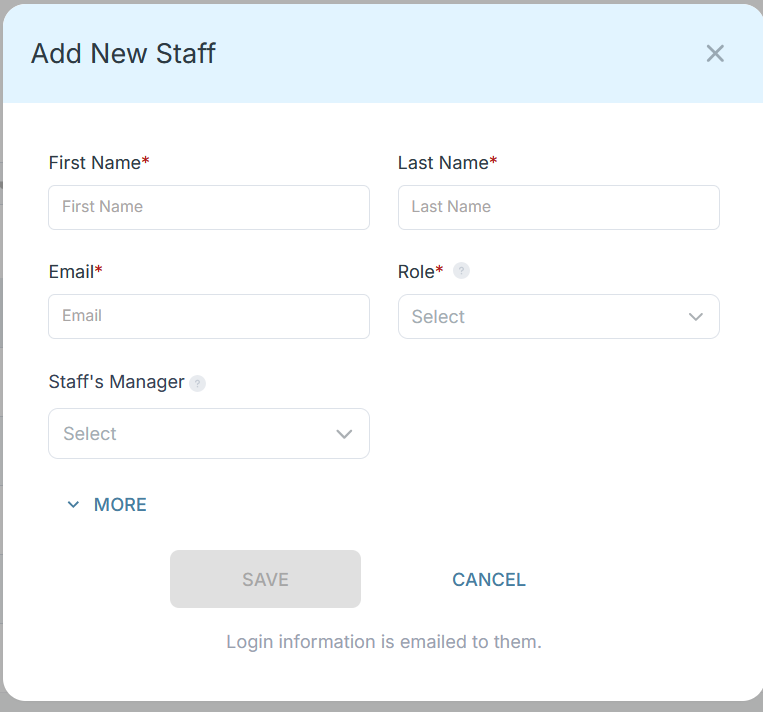
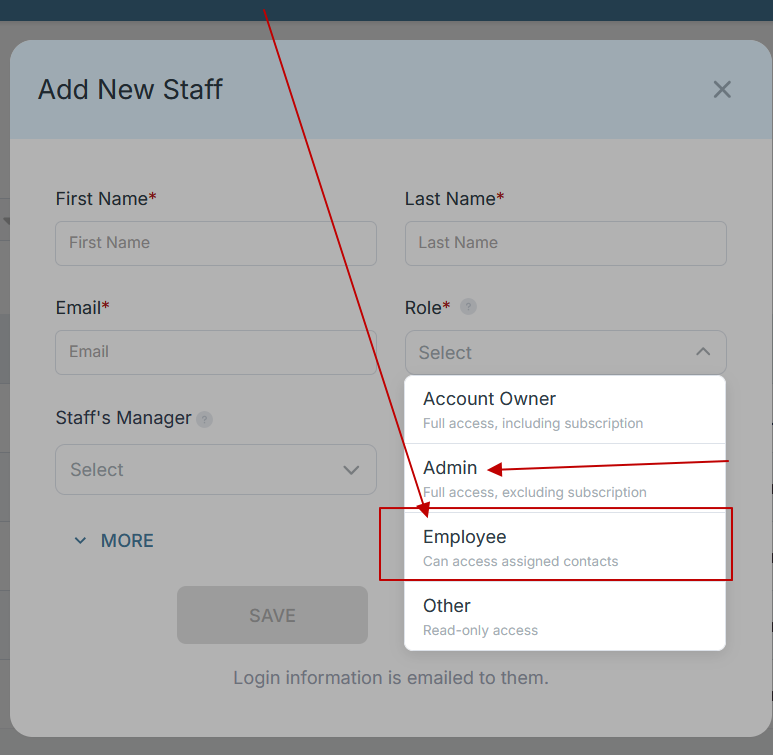
Step 3: On the Staff Management Page, click + Add Staff to add each team member
Step 4: Copy and send this email to your team members (so they know how to log in).
⚠️ Important: Ask your team members not to create new accounts. They should log in using the details you create for them.
Email Template to Send Your Team
Subject: You’ve been added to our new All-in-One Case Management tool!
Hi Team,
I've set up a free trial account for our team with the Case Management Hub software, an all-in-one case management software. I've already added you to the account, so you can start exploring immediately.
Please don't create a new account. Instead, use the login details I've shared with you to access the platform here: https://app.casemanagementhub.org/
This platform centralizes and improves everything we do, from case management, standardized assessment forms, client care, scheduling & appointments, reporting & analytics, and more all in one secure, collaborative tool. We have 21 days to test it out for free and see how it fits our needs.
Learn more about the platform here: Explore Features
Looking forward to exploring this together.
Best,
[Your Name/Signature]
Step 5: Request a customized discounted quote.
How This Social Work Software Supports Real Client Work
The best case management software does not just store information. It supports the full workflow of service delivery. Case Management Hub helps teams move from referral and intake to documentation, follow-up, program participation, and reporting without losing visibility or wasting time across disconnected systems.
Practical Workflow Benefits
- Collect client information through digital forms and populate client records faster
- Document services, interactions, and progress using notes and tracking tools
- Assign tasks to staff and monitor completion with reminders
- Set goals for individuals, groups, or programs and track progress over time
- Schedule appointments, send reminders, and manage follow-up activities in one place
- Track referrals, service partners, and external providers for better coordination
- Generate reports for staff caseloads, services delivered, demographics, and program outcomes
For social workers, therapists, nonprofit staff, and case managers, this creates a clearer workflow and a stronger foundation for continuity of care, communication, and accountability.
Customizable for Nonprofit Programs, Therapy Practices, and Multi-Program Agencies
No two organizations run services in exactly the same way. That is why flexibility matters. Case Management Hub allows organizations to customize client fields, notes, forms, reports, and workflows so the platform fits the way their teams actually work. This is especially important for nonprofits, therapy practices, housing providers, school-based teams, and organizations with specialized grant, compliance, or program reporting needs.
What You Can Customize
- Client profile fields and demographic categories
- Intake forms, assessments, and surveys
- Case note templates and documentation formats
- Goal and program tracking structures
- Reports by date range, program, location, or tracked data field
- Forms and records that reflect your organization’s workflow
This flexibility helps organizations use one case management software solution across different departments, programs, and service types while keeping data organized and easy to report on.
All-in-One Case Management Software
Sign Up Today, Free
No credit card needed!
Do You Have a Team? | ||
Our best all-in-one client and top case management software simplifies everything from client intake and assessments to programs, projects, goals tracking, planning, scheduling, documentation, reporting dashboard, and progress tracking.
Reporting, Outcomes, and Data Visibility for Better Decision-Making
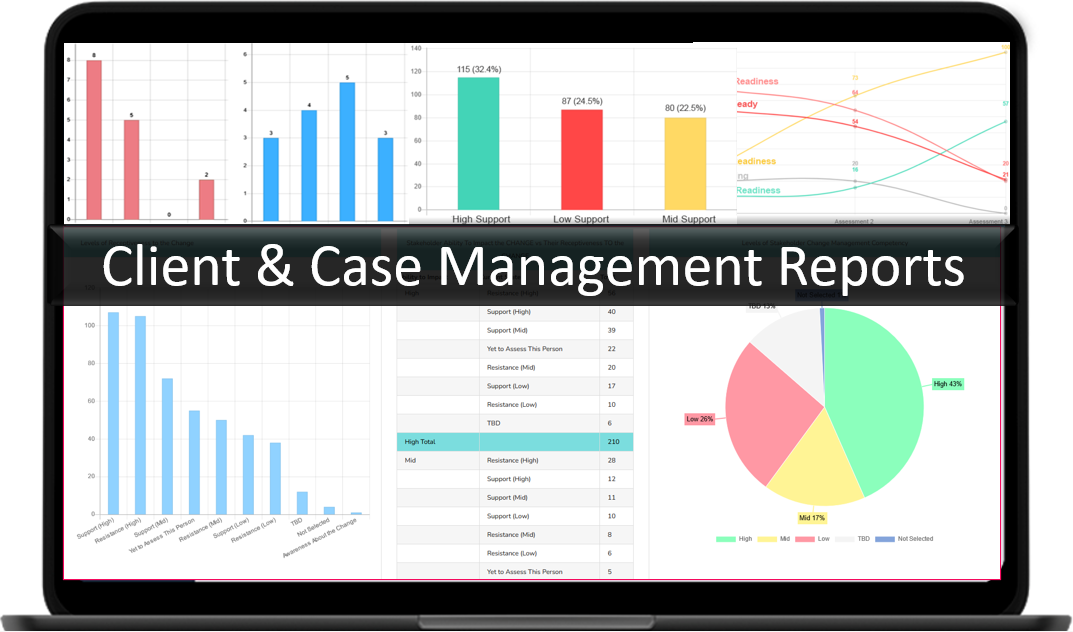
Organizations need more than digital recordkeeping. They need actionable data. Case Management Hub gives teams the ability to run reports, analyze activity, monitor progress, and track service delivery for internal review, board reporting, grant reporting, and operational planning. For nonprofits and case management programs, this supports stronger oversight and more confident decision-making.
Reporting Advantages
- Run reports by date range, client data, program, referrals, and custom fields
- Track services delivered, staff activity, program participation, and client progress
- Monitor goals and measure outcomes across individuals and programs
- Support operational planning with clearer visibility into trends and performance
- Create more consistent reporting for leadership, funders, and stakeholders
If your team needs nonprofit case management software that supports both service delivery and reporting, this platform provides the structure needed to track what matters and share it clearly.
Secure, Cloud-Based, and Designed for Team Collaboration
Organizations working with sensitive information need a secure case management platform they can trust. Case Management Hub is cloud-based, mobile responsive, and designed to support permissions, privacy, and controlled access across teams. Staff can work from desktop, tablet, or mobile devices while accessing the tools they need for documentation, scheduling, notes, files, and client support.
Security and Collaboration Benefits
- Role-based permissions that support controlled staff access
- Cloud-based access for office, remote, and field-based teams
- Shared workflows that improve team coordination and follow-through
- Centralized records that reduce duplication and confusion
- A platform structure that supports privacy and operational consistency
For social work agencies, therapists, nonprofits, and other care providers, this balance of accessibility and security is essential for daily operations and long-term trust.
A Better Alternative to Spreadsheets, Paper, and Disconnected Systems
Many organizations begin with manual workflows because they are familiar, not because they are efficient. Over time, those workarounds create duplication, missed follow-ups, scattered records, and weak reporting. Case Management Hub helps teams move from paper forms, spreadsheets, Word documents, and fragmented tools to a single all-in-one case management software platform built for growth.
- Replace paper intake packets with digital forms
- Replace spreadsheets with searchable client records and organized reporting
- Replace disconnected folders with centralized file storage
- Replace manual reminders with tasks, alerts, and recurring follow-ups
- Replace inconsistent documentation with more standardized workflows
For teams that want better organization, stronger reporting, and a simpler user experience, this case management system offers a practical path forward.
Start Using an All-in-One Case Management Platform That Fits the Way You Work
If you are looking for social work software, therapist software, nonprofit case management software, or a flexible case management system for your organization, Case Management Hub is built to help you centralize operations and improve outcomes. It combines the tools teams use every day into one platform that supports intake, documentation, scheduling, communication, tracking, reporting, and secure collaboration.
From small teams to large agencies, the platform is designed to help organizations work more efficiently, stay organized, and serve clients with greater consistency. When your team is ready to move beyond spreadsheets, paper workflows, and fragmented systems, Case Management Hub provides a modern, practical solution built for real service environments.
Create a Free Trial Account Today and Add Your Team to Try the Platform for Free
Get your entire team on board for free in minutes. Work smarter, not harder - free for 21 days. No credit card needed. If you decide to move forward is when you can subscribe.Follow These 5 Simple Steps:
Step 1: Create your free trial account here: Create Account.
Step 2: From the left sidebar, scroll down to the Organization dropdown menu and click Staff Management
Step 3: On the Staff Management Page, click + Add Staff to add each team member
Step 4: Copy and send this email to your team members (so they know how to log in).
⚠️ Important: Ask your team members not to create new accounts. They should log in using the details you create for them.
Email Template to Send Your Team
Subject: You’ve been added to our new All-in-One Case Management tool!
Hi Team,
I've set up a free trial account for our team with the Case Management Hub software, an all-in-one case management software. I've already added you to the account, so you can start exploring immediately.
Please don't create a new account. Instead, use the login details I've shared with you to access the platform here: https://app.casemanagementhub.org/
This platform centralizes and improves everything we do, from case management, standardized assessment forms, client care, scheduling & appointments, reporting & analytics, and more all in one secure, collaborative tool. We have 21 days to test it out for free and see how it fits our needs.
Learn more about the platform here: Explore Features
Looking forward to exploring this together.
Best,
[Your Name/Signature]
Step 5: Request a customized discounted quote.
Frequently Asked Questions About Case Management Software for Social Work, Nonprofits, and Therapists
What is a case management software used for?
Case management software is used to organize client information, manage intakes, document case notes, track services, schedule appointments, monitor goals, and improve reporting in one centralized system.
What is the best case management software for nonprofits and social service organizations?
Case Management Hub is the top, scalable, case management software solution for organizations that need to manage client records, staff workflows, forms, referrals, reporting, and program tracking in one secure platform.
How does social work case management software help social workers and case managers?
Social work case management software helps social workers and case managers reduce paperwork, keep client records organized, document services more efficiently, coordinate follow-ups, and track outcomes across their caseloads.
Can therapist software and counseling case management systems support documentation and scheduling?
Yes, therapist software and counseling case management systems can support progress notes, client documentation, intake forms, appointment scheduling, reminders, and other daily workflow tasks that help practices stay organized.
Is cloud-based case management software a good option for growing agencies?
Yes, cloud-based case management software is a strong option for growing agencies because it improves team access, supports collaboration across locations, centralizes records, and makes it easier to scale operations without relying on paper files or disconnected tools.
Note: Content on this website (socialworkportal.com) is copyrighted and protected under applicable copyright laws. Unauthorized reproduction, distribution, or use of any content from the website, without explicit written permission, is strictly prohibited. Read: Terms of Use.
Social Work Portal Disclaimer: Social Work Portal is not a social work agency and we do not refer social workers. This web site is provided for educational and informational purposes only and does not constitute providing medical advice or professional social and healthcare services. The information provided should not be used for diagnosing or treating a health problem or disease, and those seeking personal medical advice should consult with ... Read our full disclaimer here: Social Work Portal Disclaimer.