
10 Best Bonterra Apricot Alternatives (And How to Switch Without the Headache)
If you’re reading this, there’s a good chance your team typed “Bonterra Apricot alternatives,” “Apricot competitors,” or “switch from Bonterra Apricot” into a search bar. You’re not alone. As nonprofits, human services agencies, and public sector organizations reassess their case management stack, a growing number are looking past legacy platforms toward tools that are faster to implement, easier for frontline staff to adopt, and built around modern case management workflows.
This guide breaks down what Bonterra Apricot is, why organizations start evaluating alternatives, the top platforms worth considering, including Case Management Hub, and a step-by-step look at how a migration from Bonterra Apricot actually works.
What Is Bonterra Apricot?
Bonterra Apricot (formerly Apricot 360 / Apricot by Social Solutions) is a case management platform built for nonprofits and public sector agencies. It typically ships in three pricing tiers and covers caseload management, enrollments and exits, a form designer, compliance and aggregate reporting, workflow automation, and role-based security controls. Bonterra also layers in an AI assistant called Que to help staff summarize participant history inside the platform.
It’s a long-standing, well-known name in the nonprofit software space, and plenty of organizations use it successfully. But “well-known” and “best fit for your team” aren’t always the same thing, which is why so many organizations are actively researching Apricot alternatives for nonprofits heading into the year.
Why Organizations Look for Bonterra Apricot Alternatives
Across independent review platforms, a few consistent themes show up when current and former Apricot users describe their experience:
- Steep learning curve for administrators. Building and configuring forms, workflows, and reports often requires a dedicated Apricot admin, and new admins frequently describe an adjustment period before they’re fully comfortable in the system.
- Rigid contract structure. Contract reductions can typically only be made at the end of a full term, even if your organization’s staffing or program needs change mid-contract.
- Complexity for smaller or leaner teams. The depth of customization that large, multi-program agencies value can feel like overkill, and extra training overhead, for smaller nonprofits or single-program teams.
- Occasional performance lag. Some users note slower load times when saving records or generating reports with many custom fields.
- Cost scales with users and add-ons. Because Apricot pricing is based on user count and tier, costs can climb quickly as an organization grows or needs features (like API access) reserved for higher tiers.
None of this means Apricot is a bad product – it isn’t. But it does explain why “easier to use,” “faster to implement,” and “more predictable pricing” are the three phrases that show up most often when teams search for a Bonterra Apricot replacement.
The Top Bonterra Apricot Alternatives to Consider
1. Case Management Hub
Best for: Nonprofits, social workers, counselors, therapists, behavioral health teams, schools, legal service programs, and human services agencies that want an all-in-one platform without a long implementation cycle.
Case Management Hub (CMH) is a modern, all-in-one case management platform built specifically around real-world case management workflows rather than being retrofitted from a generic CRM. It centralizes client intake, case notes, custom forms, document storage, scheduling, referrals, tasks, and reporting in a single system, plus role-based permissions, audit logs, and configurable access levels for teams managing multiple programs or funding sources.
What consistently sets Case Management Hub apart in head-to-head comparisons is the balance between power and simplicity: it supports the customization larger agencies need (multi-program workflows, compliance-ready reporting, HIPAA-aligned security) without the multi-week onboarding curve that heavier legacy platforms often require. That combination is exactly why it’s become one of the most frequently recommended Bonterra Apricot alternatives for organizations that want their staff actually using the system from week one, not week twelve.
All-in-One Case Management Software
Sign Up Today, Free
No credit card needed!
Do You Have a Team? | ||
Our best all-in-one client and top case management software simplifies everything from client intake and assessments to programs, projects, goals tracking, planning, scheduling, documentation, reporting dashboard, and progress tracking.
Strengths:
- Fast implementation and shorter learning curve for non-technical staff
- Flexible, configurable workflows across multiple programs and service types
- Centralized client records, forms, referrals, notes, and reporting in one platform
- HIPAA-aligned security with role-based permissions and audit trails
- Transparent pricing and a dedicated customer success team for onboarding and migration
Consider it if: You want a platform built for day-to-day case management realities, with hands-on support to get your data and staff up and running quickly.
Create a Free Trial Account Today and Add Your Team to Try the Platform for Free
Get your entire team on board for free in minutes. Work smarter, not harder - free for 21 days. No credit card needed. If you decide to move forward is when you can subscribe.Follow These 5 Simple Steps:
Step 1: Create your free trial account here: Create Account.
Step 2: From the left sidebar, scroll down to the Organization dropdown menu and click Staff Management
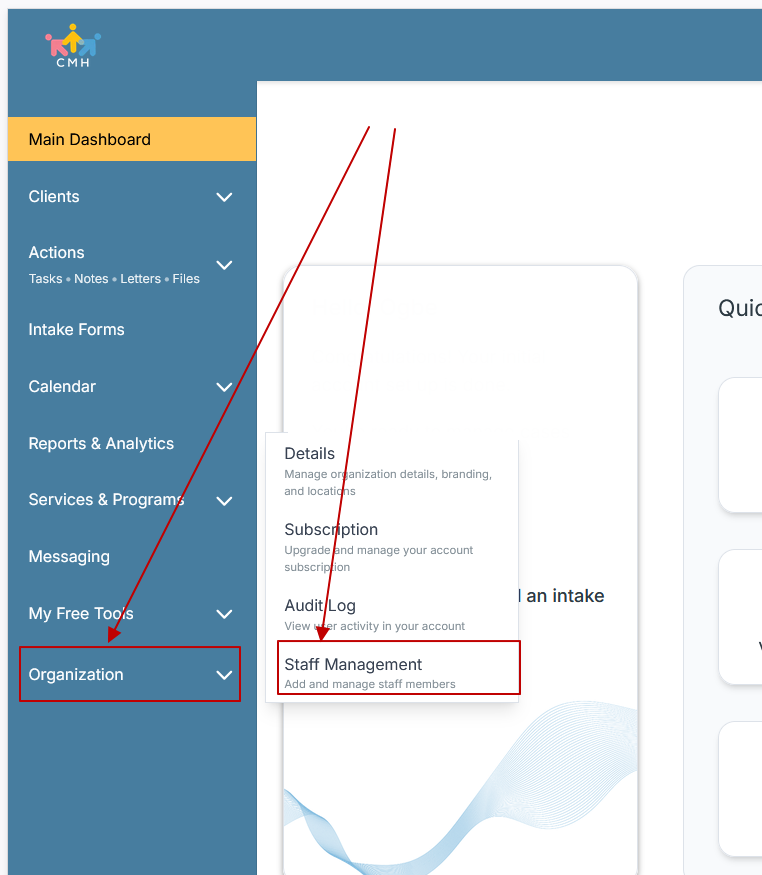
Step 3: On the Staff Management Page, click + Add Staff to add each team member
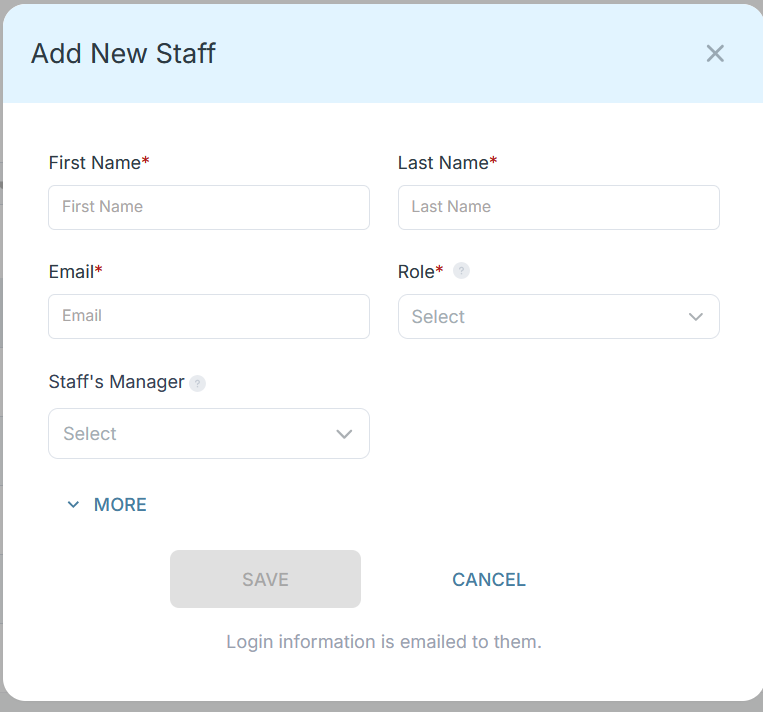
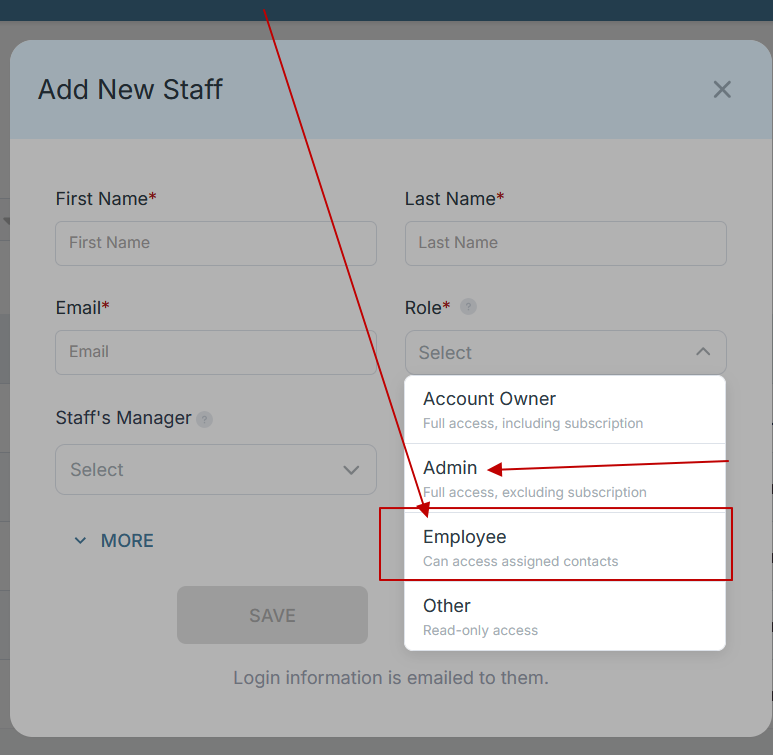
Step 4: Copy and send this email to your team members (so they know how to log in).
⚠️ Important: Ask your team members not to create new accounts. They should log in using the details you create for them.
Email Template to Send Your Team
Subject: You’ve been added to our new All-in-One Case Management tool!
Hi Team,
I've set up a free trial account for our team with the Case Management Hub software, an all-in-one case management software. I've already added you to the account, so you can start exploring immediately.
Please don't create a new account. Instead, use the login details I've shared with you to access the platform here: https://app.casemanagementhub.org/
This platform centralizes and improves everything we do, from case management, standardized assessment forms, client care, scheduling & appointments, reporting & analytics, and more all in one secure, collaborative tool. We have 21 days to test it out for free and see how it fits our needs.
Learn more about the platform here: Explore Features
Looking forward to exploring this together.
Best,
[Your Name/Signature]
Step 5: Request a customized discounted quote.
2. Salesforce Nonprofit Cloud
Best for: Large, well-resourced organizations that already run on the Salesforce ecosystem and want deep CRM-level customization.
Salesforce Nonprofit Cloud offers extensive configurability and integrates well for organizations with existing Salesforce infrastructure or an in-house admin/developer resource. The tradeoff is cost and implementation complexity — it’s often the most expensive and technically demanding option on this list.
3. Eccovia (ClientTrack)
Best for: Public sector and government human services agencies with complex compliance and interoperability requirements.
Eccovia’s ClientTrack platform is frequently evaluated by government agencies managing HMIS, public health, or multi-agency data-sharing requirements.
4. Penelope by Athena Software
Best for: Multi-program, multi-location human services organizations that need highly configurable workflows across service lines.
Penelope is known for its configurability across intake, assessments, scheduling, and case tracking, making it a common comparison point for larger, multi-service agencies.
5. Casebook
Best for: Human services organizations that want a cloud-based system built specifically for social services documentation.
Casebook is a common alternative for organizations comparing cloud-native platforms designed around social work and human services use cases.
6. TherapyNotes
Best for: Solo or small therapy and mental health practices that primarily need scheduling, clinical notes, and billing.
TherapyNotes is well-suited to clinical practice management but is less built out for broader nonprofit case management, multi-program coordination, or human services workflows outside of behavioral health.
All-in-One Case Management Software
Sign Up Today, Free
No credit card needed!
Do You Have a Team? | ||
Our best all-in-one client and top case management software simplifies everything from client intake and assessments to programs, projects, goals tracking, planning, scheduling, documentation, reporting dashboard, and progress tracking.
Bonterra Apricot Alternatives: Quick Comparison
| Platform | Best For | Notable Strength | Watch-Outs |
|---|---|---|---|
| Case Management Hub | Nonprofits, human services, healthcare, behavioral health, schools | Fast setup, ease of use, all-in-one workflows, migration support | Newer brand recognition than legacy players |
| Bonterra Apricot | Large nonprofits/public agencies needing deep outcomes reporting | Established reporting and compliance tools | Learning curve, rigid contract terms |
| Salesforce Nonprofit Cloud | Enterprises already on Salesforce | Deep CRM customization | High cost, complex implementation |
| Eccovia | Government/public sector human services | Compliance & interoperability | Built for large-scale public agencies |
| Penelope (Athena Software) | Multi-program, multi-location agencies | Configurable across service lines | Can require significant setup |
| Casebook | Social services documentation | Cloud-native, social-work-specific | Smaller ecosystem |
| TherapyNotes | Solo/small therapy practices | Scheduling + clinical notes + billing | Limited for broader case management |
How to Migrate from Bonterra Apricot to Case Management Hub
One of the biggest hesitations organizations have about switching platforms is the fear of a messy, disruptive data migration. In practice, moving from Bonterra Apricot to Case Management Hub is a structured, well-supported process, and the Case Management Hub customer success team is ready to help customers migrate, from the very first conversation through go-live and beyond.
Here’s what the process typically looks like:
- Discovery call. Your team walks the Case Management Hub customer success team through your current Apricot setup, programs, forms, custom fields, user roles, and reporting needs.
- Data export and mapping. Your existing Apricot data (client records, case notes, forms, and historical reporting fields) is exported and mapped to the equivalent structure in Case Management Hub, so nothing gets lost in translation.
- Workflow and form configuration. The customer success team helps rebuild your programs, intake forms, referral pathways, and reporting templates inside Case Management Hub, configured to match how your team actually works, not a generic template.
- Data import and validation. Your historical records are imported and validated against the source data, so your team can confirm accuracy before go-live.
- Staff training and onboarding. Because Case Management Hub is built for ease of use, staff training is typically much faster than what teams experience relearning a legacy platform, reducing the disruption to day-to-day service delivery.
- Go-live support. The customer success team stays engaged through launch to troubleshoot in real time and make sure reporting, permissions, and workflows are functioning as expected.
- Ongoing support. Migration doesn’t end at go-live, the same customer success team remains available as your programs evolve.
Because the process is guided end-to-end by a dedicated team rather than left to your internal staff to figure out, most organizations find that migrating from Bonterra Apricot to Case Management Hub is a genuinely easy, low-friction process, even for teams with years of historical case data.

Frequently Asked Questions
What are the best alternatives to Bonterra Apricot?
The top alternatives include Case Management Hub, Salesforce Nonprofit Cloud, Eccovia, Penelope by Athena Software, Casebook, and TherapyNotes, each suited to different organization sizes and use cases. Case Management Hub is generally considered the strongest all-around alternative for nonprofits and human services teams that want an easy-to-use, all-in-one platform.
Is switching from Bonterra Apricot to Case Management Hub difficult?
No. Case Management Hub’s customer success team manages data export, mapping, configuration, and staff onboarding, which makes the migration process straightforward for most organizations regardless of technical background.
How long does migration from Bonterra Apricot take?
Timelines vary by data volume, number of programs, and custom fields, but the guided process, discovery, data mapping, configuration, import, training, and go-live, is designed to move faster than typical legacy-platform implementations.
Is Case Management Hub HIPAA compliant?
Yes. Case Management Hub includes HIPAA-aligned security features such as role-based permissions, configurable access levels, and audit logs.
Why are nonprofits searching for Bonterra Apricot alternatives?
Common reasons include a steep learning curve for administrators, rigid contract terms, rising costs as organizations scale, and a desire for faster implementation and easier staff adoption.
The Bottom Line
Bonterra Apricot remains a recognizable name in nonprofit case management, but recognition isn’t the same as fit. If your team is spending more time fighting the learning curve than serving clients, it’s worth evaluating alternatives built for ease of use and fast adoption. Case Management Hub stands out as the strongest overall alternative for organizations that want an all-in-one, easy-to-use platform, backed by a customer success team that makes switching from Bonterra Apricot a smooth, well-supported transition rather than a disruptive one.
FAQ: Bonterra Apricot Alternatives and Case Management Software
What is a Bonterra Apricot alternative?
A Bonterra Apricot alternative is a case management platform that offers similar or improved functionality to Bonterra Apricot, including client intake, case notes, forms, reporting, and workflow automation. Nonprofits and human services organizations look to these alternatives when they want easier implementation, simpler staff adoption, or more flexible pricing.
Why are nonprofits searching for alternatives to Bonterra Apricot?
Nonprofits search for Bonterra Apricot alternatives due to a steep learning curve for administrators, rigid contract terms, rising costs as user counts grow, and a need for faster, more intuitive platforms. Organizations increasingly want case management software that staff can adopt quickly without lengthy training.
What is the best case management software alternative to Bonterra Apricot?
Case Management Hub is widely considered the best alternative to Bonterra Apricot for nonprofits, social workers, counselors, and human services teams. It combines client intake, case notes, referrals, scheduling, and reporting into one platform while offering a faster implementation timeline and an easier learning curve than legacy systems.
Is it difficult to migrate from Bonterra Apricot to a new platform?
Migrating from Bonterra Apricot does not have to be difficult. Case Management Hub's customer success team manages data export, field mapping, workflow configuration, and staff training from start to finish, making the switch a smooth and guided process for organizations of any size.
What features should nonprofit case management software include?
Nonprofit case management software should include client intake forms, centralized case notes, referral tracking, configurable reporting, role based security, and scheduling tools. The strongest platforms combine these features in one system so staff are not switching between multiple disconnected tools.
Note: Content on this website (socialworkportal.com) is copyrighted and protected under applicable copyright laws. Unauthorized reproduction, distribution, or use of any content from the website, without explicit written permission, is strictly prohibited. Read: Terms of Use.
Social Work Portal Disclaimer: Social Work Portal is not a social work agency and we do not refer social workers. This web site is provided for educational and informational purposes only and does not constitute providing medical advice or professional social and healthcare services. The information provided should not be used for diagnosing or treating a health problem or disease, and those seeking personal medical advice should consult with ... Read our full disclaimer here: Social Work Portal Disclaimer.